Here are some usefull URL hemanshu mestry gave to Flash Lite Community:
FlashLite 1.1 - SITES
http://www.macromedia.com/software/flash/download/device_profiles/ (Device Profile Updates -- Get the latest mobile device profiles for use in the Flash Professional 8 mobile emulator)
If you�re a developer, you can purchase the stand-alone Flash Lite 1.1 player
for these supported devices from the Macromedia online store at
http://www.macromedia.com/store/. For a list of commonly asked questions
about purchasing the stand-alone player, see the Flash Lite 1.1 FAQ at
www.macromedia.com/go/bb660cc2/. For help installing the player, see
TechNote 4632f5aa at http://www.macromedia.com/go/4632f5aa. [ Purchase the stand-alone Flash Lite 1.1 player ]
http://www.macromedia.com/mobile/ (Mobile & Devices -- Flash Lite Exchange)
http://www.macromedia.com/cfusion/exchange/index.cfm?view... ( Lite Exchange Check out the latest Flash Lite examples created by developers.
More examples of Flash Lite content can be found in the Macromedia Flash Lite Exchange
(http://www.macromedia.com/cfusion/exchange/index.cfm?view=sn310) .
http://www.macromedia.com/cfusion/knowledgebase/index.cfm?id=4632f5aa (Installing the Flash Lite player and content onto a handset)
Flash Lite TechNote
http://www.macromedia.com/support/flashlite/
http://www.macromedia.com/mobile/supported_devices/ (For the most current list of devices that support Flash Lite, see the Supported Devices page located at)
http://www.macromedia.com/store/ (You can purchase the stand-alone player for development purposes from the Macromedia online store at)
http://www.macromedia.com/mobile/supported_devices/ (The Flash Lite player is installed on a variety of devices. For a full list of devices with Flash Lite installed, see the Supported Devices page on the Macromedia website at )
++++++++++++++++++++++++++++++++++++++++++++++++++++++++++++++++++
http://casario.blogs.com/mmworld/flashlite/index.html ( How to install FlashLite 2 and 1.1 on the same device / Best Practise for FlashLite headers / Use Bluetooth with FlashLite / How to uninstall FlashLite from your mobile phone )
http://casario.blogs.com/mmworld/2005/11/flashlite_webcl.html (FlashLite Webclass source file,examples and slides)
http://casario.blogs.com/mmworld/2005/11/flashlite_webcl.html ( Very good templates )
http://www.avabooks.com.sg/avauk/details.php?id=107 ( AVA Books > AVA Academia > Designing for Small Screens
-- Designing for Small Screens
Carola Zwick, Burkhard Schmitz, Kerstin Kühl)
http://groups.yahoo.com/group/FlashLite/post
http://www.flickr.com/groups/flashlite/ ( Macromedia FlashLite -- Group Photo Pool (See all 125 photos) )
http://www.biskero.org/ ( All Flash Lite Links )
http://www.biskero.org/?page_id=71 (Flash Lite & Companies)
http://www.biskero.org/?page_id=333 (Flash Lite Resources)
http://www.biskero.org/?page_id=342 (Flash Lite Tutorials)
http://www.macromedia.com/devnet/devices/articles/xml_flashlite.html (Loading, Parsing, and Locally Storing XML in Flash Lite 2)
http://www.fnprotraining.com/
http://www.fnprotraining.com/nokia/index.html ( Mobile Flash Hunt Nokia )
http://flashlite4mobile.com/index.html ( Flash lite Store )
http://www.microforuminternational.com/games/index.php?menu=3&action=battlecruiser ( Mobile Gmae List )
http://www.microforum.it/mobile/hockey.shtml
http://www.clickgamer.com/moreinfo.htm?pid=2715§ion=J2ME&set_device=997
http://richardleggett.co.uk/blog/index.php?blog=2&cat=28&page=1&disp=posts&paged=2 ( Flash lite examples )
http://www.edutech.ch/flashnotes/index.php?zfmore=4&zftemplate=flash_simplecss&zfposition=p4
http://www.edutech.ch/flashnotes/resources.php ( All resource links )
http://www.petebarrwatson.com/archives/2005/07/
http://www.petebarrwatson.com/archives/2005/07/rock_paper_scis_1.html (Rock, Paper, Scissors - a Flash Lite game - download )
http://www.aniway.com/flash_lite_for_mobile_game_developers/?p=6 (Welcome to the Flash Lite for Mobile Game Developers blog)
http://www.blueskynorth.com/BSN3/news/index.html#newsitem14 ( game )
http://www.scottjanousek.com/blog/?p=232 ( game )
http://www.kurai.it/ ( game )
http://www.microforum.it/mobile/callingyuki.shtml ( game / template )
+++++++++++++++++++++++++++++++++++++++++++++++++++++++++++++++++++++
http://www.flash-lite.de/downloads.html ( templates)
http://weblogs.macromedia.com/sfegette/archives/2005/09/fotd_20_flash_8.cfm ( Flash Emulator )
+++++++++++++++++++++++++++++++++++++++++++++++++++++++++++++++++++++
http://www.flashmobile.it/index.php?page=works ( Freeware software -- for mobiles )
http://www.flashmobileforum.org/node/13 ( Links)
http://www.flashmobileforum.org/capabilities/showCapabilities1_1.php (Flash Lite Capabilities Database - Flash Lite 1.1)
++++++++++++++++++++++++++++++++++++++++++++++++++++++++++++++++++++++
http://www.flashmobileforum.org/node/103 (Flash Mobile Forum)
www.richardleggett.co.uk
www.flashmobileforum.org
For more on Flash Lite and Flash for devices, please visit:
www.macromedia.com/mobile/
jirka@fandango.cz
http://www.fandango.cz/aplikace.php ( Flash Lite - Games )
http://www.video-animation.com/flashlite_06.shtml (Notes from a FlashLite Seminar by Brian Chau )
http://www.actionscript.it/ (I Tutorial di Actionscript.it)
http://www.flashlite.it/
http://www.webmasterpoint.org/ (Flash lite - downloads )
http://www.webmasterpoint.org/script/flash/download_animazioni_script.html ( All Flash downloads )
http://www.mobile.chatebot.com/ (Flash Lite for your mobile phone.
Click on the icons below to test our games. )
+++++++++++++++++++++++++++++++++++++++++++++++++++++++++++++++++++++++
+++++++++++++++++++++++++++++++++++++++++++++++++++++++++++++++++++++++
+++++++++++++++++++++++++++++++++++++++++++++++++++++++++++++++++++++++
Macromedia Flash Lite 1.1
http://www.macromedia.com/devnet/devices/articles/flashlite_training.html ( Training - Getting Started with Flash Lite 1.1) ( Mobile and Devices Developer Center )
[ Watch the presentation (approximately one hour) ]
[ Tutorials and sample files: ]
http://www.macromedia.com/support/flash/downloads.html#flash8pro (Download the English Windows Update (EXE, 15.1 MB))
http://www.macromedia.com/devnet/
http://www.macromedia.com/devnet/devices/articles/flashlite_bestpractices.html ( Best Practices for Developing Macromedia Flash Lite 1.1 Content )
http://www.macromedia.com/devnet/logged_in/tevans_flashlite.html (Introducing Macromedia Flash Lite 1.1 - Troy Evans
Product Manager, Mobile and Devices
Macromedia
)
http://www.macromedia.com/devnet/devices/flashlite.html#cdk (Getting Started with Flash Lite 1.1 )
http://www.flashdevices.net/ (Flash Devices � Flash Development Resource for Mobile Devices ) ( New Adobe Flash Mobile Forums )
http://www.macromedia.com/cfusion/webforums/forum/categories.cfm?catid=195 (FORUMS : Flash Handhelds)
http://www.macromedia.com/devnet/devices/ ( For an up-to-date list of handsets that support Flash Lite 1.1, refer to the Macromedia Mobile and Devices Developer Center. )
++++++++++++++++++++++++++++++++++++++++++++++++++++++++++++++++++++++++
++++++++++++++++++++++++++++++++++++++++++++++++++++++++++++++++++++++++
++++++++++++++++++++++++++++++++++++++++++++++++++++++++++++++++++++++++
++++++++++++++++++++++++++++++++++++++++++++++++++++++++++++++++++++++++
Additional resources :
For the latest information on developing Flash Lite applications, plus
advice from expert users, advanced topics, examples, tips, and other
updates, see the Mobile and Devices Developer Center at
http://www.macromedia.com/devnet/devices/.
For TechNotes, documentation updates, and links to additional resources
in the Flash Lite developer community, see the Macromedia Flash Lite
Support Center at http://www.macromedia.com/support/flashlite/.
++++++++++++++++++++++++++++++++++++++++++++++++++++++++++++++++++++++++
http://www.filesaveas.com/series60pcconnect.html ( Connecting to a PC with a Series 60 phone )
http://www.filesaveas.com/bluetooth.html (Bluetooth information - What is Bluetooth?)
++++++++++++++++++++++++++++++++++++++++++++++++++++++++++++++++++++++++++
++++++++++++++++++++++++++++++++++++++++++++++++++++++++++++++++++++++++++
++++++++++++++++++++++++++++++++++++++++++++++++++++++++++++++++++++++++++
++++++++++++++++++++++++++++++++++++++++++++++++++++++++++++++++++++++++++
http://www.macromedia.com/cfusion/exchange/index.cfm...
(Flash Lite Exchange)
http://www.macromedia.com/software/flashlite/productinfo/overview/datasheet_frameset.html (Getting Started with Flash Lite 2.0)
http://www.macromedia.com/software/flashlite/ ( Resources )
http://www.macromedia.com/cfusion/entitlement/index.cfm?e=flashcdk
+++++++++++++++++++++++++++++++++++++++++++++++++++++++++++++++++++++++++++
http://www.macromedia.com/devnet/devices/flashlite.html#cdk ( Download the Macromedia Flash Lite 1.1 CDK )
[ Flash Lite 1.1 Articles - Getting Started with Flash Lite 1.1 ]
http://www.macromedia.com/cfusion/entitlement/index.cfm?e=flashcdk ( Download - Macromedia Flash Lite 1.1 Content Development Kit (CDK) MX 2004)
http://www.macromedia.com/software/flashlite/ (Flash Lite -- Create a powerful experience for mobile phones and consumer electronics devices using Flash Lite)
http://www.macromedia.com/downloads/ ( Products)
http://www.adobe.com/aboutadobe/pressroom/pressreleases/200601/010306FlashLite.html (New Flash Technology From Adobe Enables High-Impact User Experiences For Consumer Devices)
++++++++++++++++++++++++++++++++++++++++++++++++++++++++++++++++++++++++
http://www.petebarrwatson.com/archives/2004/06/flash_lite_11.html ( pete barr- watson )
[ Flash Lite 1.1
Mobile Flash ]
http://www.scottjanousek.com/blog/?p=140 (Flash Lite 1.1 �Function Clip� and a little trick we learned from the Mobile XD MAX session)
)))))))))))))))))))))))))))))))))))))))))))))))))))))))))))))))))))))))))))))))))))))))))))))))))))))))))))))))))))))))))))))
Guidelines :
Suppose you have this great idea for some game or content for a handset, but you don't know where to start? Most often this is the case, and, with some proper planning, it's not that difficult to determine if your ideas can become reality. Here's a checklist you can use to help you get started:
Would I or anyone else use the content on a handset?
What are the advantages of having this content on a handset?
Will all of the information fit on the screen?
Does the information need to be updated?
How will a user interact with the content?
How difficult will it be to create this content for a handset?
If you use this checklist as a guide then you'll be well on your way to creating Flash content for handsets
)))))))))))))))))))))))))))))))))))))))))))))))))))))))))))))))))))))))))))))))))))))))))))))))))))))))))))))))))))))))))))))
Development Checklist
I wrote about this in the Flash Lite 1.1 CDK, and it's so important that I wanted to mention it again. When you develop Flash Lite 1.1 content for handsets, make sure to check the following items:
Does the Flash content work?
Is the Flash content intuitive and easy to interact with?
Does the Flash content load data and SWF files without any problems?
Can you optimize the images or rewrite code to further reduce the file size and memory requirements while improving performance?
Are all bitmap images successfully decoded and rendered on the handset?
+++++++++++++++++++++++++++++++++++++++++++++++++++++++++++++++++++++++++++
http://www.macromedia.com/cfusion/webforums/forum/categories.cfm?forumid=68&catid=472 ( FORUM )
[
Nokia N70, Flash Lite 2.0 loading in .xml , .txt, help
I can't load in a .xml, .swf or .txt file using flash lite 2.0 and my nokia N70
Alpha Channel pngs in Lite2
Flash lite 2 - load external XML
loading external XML
Pushing FlashLite Player with apps?
Pushing FlashLite Player with apps?
Tutorial For flash lite 2.0?
Tutorial For flash lite 2.0?
Flash Lite and windows mobile 2003
Is Flash Lite v2 is supported on windows mobile 2003?
Communicating with XML
o2 PayNgo GPRS unable to load data
what tarrif are you all on
Flash over MMS
FLASH LITE 2.0 PLAYER WONT INSTALL
installation security error, unable to install
Vodafone restriction
FL2.0 Nokia N70 local XML.load() problem
Flash Lite 2.0/Flash Lite 1.1 font problem
CallerID ?
can Flash Lite see CallerID info?
JAR / JAD compiler for Flash Lite?
JAR / JAD compiler for Flash Lite??
Sony W900i & Flash Lite
Sony W900i & Flash Lite
flash player for windows mobile 2003
text field variable
each dynamic text field , could has only one variable name?
special characters in Flash Lite 1.1
Sending SMS on N70
]
C:\Documents and Settings\All Users\Application Data\Macromedia\Flash 8\en\Configuration\HelpPanel\Help\FlashLiteDevelopersGuide\00005152.html
C:\Documents and Settings\All Users\Application Data\Macromedia\Flash 8\en\Configuration\HelpPanel\Help\FlashLiteDevelopersGuide\00005152.html
file:///C:/Documents%20and%20Settings/All%20Users/Application%20Data/Macromedia/Flash%208/en/Configuration/HelpPanel/Help/FlashLiteDevelopersGuide/00005156.html#139447 (Changing test devices (Flash Professional Only))
http://www.emulator-zone.com/doc.php/mobile/
http://www.dotnet247.com/247reference/msgs/9/49046.aspx ( OFF TOPIC - Free Mobile Emulator?)
24 April 2006
Code:Flash Lite 2. 0 AS2 Key "catcher" code
Here is an example code how Hayden Porter currently handling key down events.
His main concern is whether using the following code for detecting 12
digit key presses will work on international phones.
String.fromCharCode(Key.getAscii())
I am assuming this should convert the ASCII code into, the physical
label printed on a given key such as 1-9,0#,*.
/*
Define key DOWN events
*/
var keyListener:Object = new Object();
keyListener.onfiltered= function() {
// for 5 way navigation and soft key down events
switch(Key.getCode()){
case Key.ENTER: my_txt.text = "enter"; break;
case Key.LEFT: my_txt.text = "left"; break;
case Key.RIGHT: my_txt.text = "right"; break;
case Key.UP: my_txt.text = "up"; break;
case Key.DOWN: my_txt.text = "down"; break;
case ExtendedKey.SOFT1: my_txt.text = "left soft key"; break;
case ExtendedKey.SOFT2:
my_txt.text = "right soft key";
fscommand2("Quit");
break;
}
// for 12 digit keypad key down events
switch(String.fromCharCode(Key.getAscii())){
case "1": my_txt.text = "1";break;
case "2": my_txt.text = "2";break;
case "3": my_txt.text = "3";break;
case "4": my_txt.text = "4";break;
case "5": my_txt.text = "5";break;
case "6": my_txt.text = "6";break;
case "7": my_txt.text = "7";break;
case "8": my_txt.text = "8";break;
case "9": my_txt.text = "9";break;
case "0": my_txt.text = "0";break;
case "*": my_txt.text = "*";break;
case "#": my_txt.text = "#";break;
}
};
Key.addListener(keyListener);
His main concern is whether using the following code for detecting 12
digit key presses will work on international phones.
String.fromCharCode(Key.getAscii())
I am assuming this should convert the ASCII code into, the physical
label printed on a given key such as 1-9,0#,*.
/*
Define key DOWN events
*/
var keyListener:Object = new Object();
keyListener.onfiltered= function() {
// for 5 way navigation and soft key down events
switch(Key.getCode()){
case Key.ENTER: my_txt.text = "enter"; break;
case Key.LEFT: my_txt.text = "left"; break;
case Key.RIGHT: my_txt.text = "right"; break;
case Key.UP: my_txt.text = "up"; break;
case Key.DOWN: my_txt.text = "down"; break;
case ExtendedKey.SOFT1: my_txt.text = "left soft key"; break;
case ExtendedKey.SOFT2:
my_txt.text = "right soft key";
fscommand2("Quit");
break;
}
// for 12 digit keypad key down events
switch(String.fromCharCode(Key.getAscii())){
case "1": my_txt.text = "1";break;
case "2": my_txt.text = "2";break;
case "3": my_txt.text = "3";break;
case "4": my_txt.text = "4";break;
case "5": my_txt.text = "5";break;
case "6": my_txt.text = "6";break;
case "7": my_txt.text = "7";break;
case "8": my_txt.text = "8";break;
case "9": my_txt.text = "9";break;
case "0": my_txt.text = "0";break;
case "*": my_txt.text = "*";break;
case "#": my_txt.text = "#";break;
}
};
Key.addListener(keyListener);


Sony Ericsson series with Flash Lite supported in Indonesia
I receive email from Indonesian's Sony ericsson Customer Support about SE series with Flash Lite supported in Indonesia, which is ;
- Sony Ericsson P900
- Sony Ericsson P910i
- Sony Ericsson K600i
- Sony Ericsson K608i
- Sony Ericsson V800
- Sony Ericsson W550i
- Sony Ericsson W900i
It support Flash Lite 1.1.But we still need to download Flash Lite application from Macromedia to work on it.Too bad :(
- Sony Ericsson P900
- Sony Ericsson P910i
- Sony Ericsson K600i
- Sony Ericsson K608i
- Sony Ericsson V800
- Sony Ericsson W550i
- Sony Ericsson W900i
It support Flash Lite 1.1.But we still need to download Flash Lite application from Macromedia to work on it.Too bad :(
18 April 2006
Web:Create SIS
Most Flash Lite application release on swf and sis.For older symbian version, we can publish our Flash Lite as sis file.We can create sis file with trusted key, and other as Symbian release on site : symbian
10 April 2006
WEB : New Flash Lite 2.0 Game
Felipe has sent an URL for download his Flash Lite game for free.
You can check by this URL :
You can check by this URL :
English Version
Chinese version
07 April 2006
WEB : Verizon and Adobe
Good news from Verizon and Adobe.
Verizon Wireless to Develop Flash Mobile Ecosystem in North America;
Verizon Wireless and Adobe Forge Alliance to Deliver Flash-Based
Content and User Experiences
BEDMINSTER, N.J. & SAN JOSE, Calif.--(BUSINESS WIRE)--April 5,
2006--Adobe Systems Incorporated (Nasdaq:ADBE) today announced a
strategic alliance with Verizon Wireless to start a mobile ecosystem
built around Flash(R) technology that will allow developers to create
new interactive mobile content experiences for Verizon Wireless
customers. Through this agreement, Verizon Wireless is expected to
become the first wireless operator in North America to introduce Flash
enabled handsets that use the technology to deliver a customized user
experience. Developers will be able to create and offer new rich
content, applications and data services based on Flash and targeted at
these handsets.
Info, here.
Verizon Wireless to Develop Flash Mobile Ecosystem in North America;
Verizon Wireless and Adobe Forge Alliance to Deliver Flash-Based
Content and User Experiences
BEDMINSTER, N.J. & SAN JOSE, Calif.--(BUSINESS WIRE)--April 5,
2006--Adobe Systems Incorporated (Nasdaq:ADBE) today announced a
strategic alliance with Verizon Wireless to start a mobile ecosystem
built around Flash(R) technology that will allow developers to create
new interactive mobile content experiences for Verizon Wireless
customers. Through this agreement, Verizon Wireless is expected to
become the first wireless operator in North America to introduce Flash
enabled handsets that use the technology to deliver a customized user
experience. Developers will be able to create and offer new rich
content, applications and data services based on Flash and targeted at
these handsets.
Info, here.
04 April 2006
WEB : Mysite has been added to Macromedia XML News Aggregator
I received email from Macromedia today to inform my site on blogger, http://agushery.blogspot.com, has been added to Macromedia XML News Aggregator.
mxna@macromedia.com to me
2:20 am
Your site has been added to the Macromedia XML News Aggregator (MXNA 2.0):
http://weblogs.macromedia.com/mxna
You can find more information on the Macromedia XML News Aggregator at:
http://weblogs.macromedia.com/mxna/About.cfm
and bla bla bla...
Thank you Macromedia!
mxna@macromedia.com to me
2:20 am
Your site has been added to the Macromedia XML News Aggregator (MXNA 2.0):
http://weblogs.macromedia.com/mxna
You can find more information on the Macromedia XML News Aggregator at:
http://weblogs.macromedia.com/mxna/About.cfm
and bla bla bla...
Thank you Macromedia!
03 April 2006
Code : FL 1.1 and FL 2.0
Flash Lite 1:
// Frame 1
totalImages = 10;
currentImage = 0;
// Frame 2
loadMovie( "img" add currentImage, "img" add currentImage add ".jpg" );
currentImage++;
// Frame 3
if( currentImage < totalImages ) gotoAndPlay (2);
else stop();
_______________________________________________
Flash Lite 2:
var totalImages = 10;
var currentImage = 0;
onfiltered= function()
{
this["img" + currentImage].loadMovie( "img" + currentImage + ".jpg");
currentImage++;
if( currentImage == totalImages ) onfiltered= undefined;
}
// Frame 1
totalImages = 10;
currentImage = 0;
// Frame 2
loadMovie( "img" add currentImage, "img" add currentImage add ".jpg" );
currentImage++;
// Frame 3
if( currentImage < totalImages ) gotoAndPlay (2);
else stop();
_______________________________________________
Flash Lite 2:
var totalImages = 10;
var currentImage = 0;
onfiltered= function()
{
this["img" + currentImage].loadMovie( "img" + currentImage + ".jpg");
currentImage++;
if( currentImage == totalImages ) onfiltered= undefined;
}
WEB : Richard's MMUG FL Download
Here another Application we can get from the expert, Richard.In here you'll find MMUG Flash Lite Application.Go this site.
WEB : Unsupported Classes
Macromedia on Livedocs said that it's not possible to access a phone's camera via Flash Lite (v1.1 or 2.x) -the API simply doesn't support it.
Check out the live docs for more info:
http://livedocs.macromedia.com/
Try 'Flash Lite 2.x ActionScript Language Reference' > 'Unsupported
ActionScript' > 'Unsupported Classes':
"Unsupported Classes
Accessibility, Camera, ContextMenu, ContextMenuItem, CustomActions,
LocalConnection, Microphone, NetConnection, NetStream, PrintJob,
TextField.StyleSheet, TextSnapshot, XMLSocket"
Check out the live docs for more info:
http://livedocs.macromedia.com/
Try 'Flash Lite 2.x ActionScript Language Reference' > 'Unsupported
ActionScript' > 'Unsupported Classes':
"Unsupported Classes
Accessibility, Camera, ContextMenu, ContextMenuItem, CustomActions,
LocalConnection, Microphone, NetConnection, NetStream, PrintJob,
TextField.StyleSheet, TextSnapshot, XMLSocket"
WEB : Justin's Seattle Flash Lite Presentation
Want to get more file of Flash Lite source to learn?Please visit Justin.
On his latest post, he send some file of his latest worked.Flick search, Manhattan, Pellet pop, and Maze game, all can be downloaded here.
As he said, he wrapped up his presentation by talking about how Flash Lite 2.0 is actually moving ahead of the desktop player in certain cases.
On his latest post, he send some file of his latest worked.Flick search, Manhattan, Pellet pop, and Maze game, all can be downloaded here.
As he said, he wrapped up his presentation by talking about how Flash Lite 2.0 is actually moving ahead of the desktop player in certain cases.
28 March 2006
WEB : U-10 Content
Still remember about U-10 from I-river? for you who want to have game/appilcation on your machine, you can have it here :
www.mobile.chatebot.com
http://www.gadgetkorea.com/ (go to U10 Contents forum)
hope can help!
www.mobile.chatebot.com
http://www.gadgetkorea.com/ (go to U10 Contents forum)
hope can help!
25 March 2006
Flash Player 6 and Flash Lite 2
This is Hayden Porter posted on Flash Lite Mailing List about the difference between Flash Player 6 and Flash Lite 2 :
Flash 6 is essentially a AS1 platform, though I think you can use
certain AS2 syntax conventions if you want to make your code
compatible between Flash 6 and FlashLite 2.
Flash 6 does not support classes added in Flash 7 such as
MovieClipLoader class, which is also available in FlashLite 2. So
compare the classes between the two platforms for compatibility.
Flash 6 does support system.cababilities object for checking network
connection, battery level and some other features, but this would be
more limited than Flash Lite 2.
Flash 6 does not support any of the fscommand2() functions available
to Flash Lite.
Flash 6 does not support device audio, and instead relies upon built
in sound, not sure if this is implemented in 7710. There is not
likely any FLV video support in Flash 6 mobile devices.
Flash 6 mobile does support xml.sockets (atleast on PPC). This is not
supported in Flash Lite 2.
You might ask more about the 7710 player in the Flash handhelds forum
at macromedia.com. There have been other people asking about this
device in the past, though it seems hard to get information about it.
Also you should download the Pocket PC CDK to know how Flash 6 for
mobile compares to desktop.
Unfortunately, there is no CDK for this device. I wish Adobe would do
a better job at releasing CDKs for devices currently on the market.
Nokia also has the Nokia Internet Tablet with Flash 6, but there is no
CDK for this either.
Content developers cant really make stuff without the CDK and
licensees may not see value of licensing Flash if there is no one
making content, because there is no CDK.
Notes : Flash Lite and Flash 6 are different in that flashlite has built in phone
specific functionalities that are acheaved through fscommand2.
Flashlite is built to take advantage of the phones small memory and cpu capabilities.
Flash 6 cant run on a mobile phone.
Flash 6 is essentially a AS1 platform, though I think you can use
certain AS2 syntax conventions if you want to make your code
compatible between Flash 6 and FlashLite 2.
Flash 6 does not support classes added in Flash 7 such as
MovieClipLoader class, which is also available in FlashLite 2. So
compare the classes between the two platforms for compatibility.
Flash 6 does support system.cababilities object for checking network
connection, battery level and some other features, but this would be
more limited than Flash Lite 2.
Flash 6 does not support any of the fscommand2() functions available
to Flash Lite.
Flash 6 does not support device audio, and instead relies upon built
in sound, not sure if this is implemented in 7710. There is not
likely any FLV video support in Flash 6 mobile devices.
Flash 6 mobile does support xml.sockets (atleast on PPC). This is not
supported in Flash Lite 2.
You might ask more about the 7710 player in the Flash handhelds forum
at macromedia.com. There have been other people asking about this
device in the past, though it seems hard to get information about it.
Also you should download the Pocket PC CDK to know how Flash 6 for
mobile compares to desktop.
Unfortunately, there is no CDK for this device. I wish Adobe would do
a better job at releasing CDKs for devices currently on the market.
Nokia also has the Nokia Internet Tablet with Flash 6, but there is no
CDK for this either.
Content developers cant really make stuff without the CDK and
licensees may not see value of licensing Flash if there is no one
making content, because there is no CDK.
Notes : Flash Lite and Flash 6 are different in that flashlite has built in phone
specific functionalities that are acheaved through fscommand2.
Flashlite is built to take advantage of the phones small memory and cpu capabilities.
Flash 6 cant run on a mobile phone.
20 March 2006
Web :Most Popular Mobile Platform Development
i heard lots of wikipedia, but i havent try it one.but today i found interesting article about mobile platform.yes,,,its about flashlite, one of them.
This page summarizes the known differences between the most popular mobile platform development options for handheld devices such as a PDA or mobile phones.
Its about Symbian, J2ME,Python, .net Compact,BREW.
It said, flash lite are ideal for Graphics-heavy options, well, you can find out more here.
This page summarizes the known differences between the most popular mobile platform development options for handheld devices such as a PDA or mobile phones.
Its about Symbian, J2ME,Python, .net Compact,BREW.
It said, flash lite are ideal for Graphics-heavy options, well, you can find out more here.
14 March 2006
Optimization Tips and Tricks for Flash Lite 2
Great tips from Jonathan Duran, Macromedia Developer Support Manager for Mobile and Devices, to optimize file for Flash Lite 2.
Monitoring and Managing Memory on the Device
Monitoring and Managing Memory on the Device
- Use size reports to manage SWF file size
- FSCommand2(“GetTotalPlayerMemory”)
- FSCommand2(“GetFreePlayerMemory”)
Optimizing Assets
- Avoid complex vectors with too many curves and points.
- Attempt to use primitive vectors including circles, squares, and lines.
- Experiment converting vectors to JPEGs and test how this affects performance.
- Wherever possible use JPEGs optimized for smaller file size in an external editor such as Photoshop or Fireworks and save for the appropriate bit depth.
- Use PNGs if bitmap transparency is required and cannot be faked by using masked JPEGs or JPEGs merged with the background.
- When using transparent PNGs insure that they do not overlap (including the transparent areas). Rendering transparency through another transparency will exponentially burden the processor.
- Experiment converting JPEGs to vectors (via Trace Bitmap command in Flash) and test how this affects performance.
On Framerates
- Most supported handsets will playback Flash at 12-15 frames per second(fps)
- Low-end = 6-12 fps
- Average = 12-15 fps
- High-end = 15+ fps
- During development limit the framerate to resemble playback speed on target handset to test responsiveness and speed of animation in low fps situations
- Set the framerate to at least 20 fps when publishing final file to avoid artificially limiting performance should the handset be capable of higher framerate
Animation Performance
- Transparency and gradients are processor intensive tasks and should be used sparingly. Experiment with faking transparency using JPEGs, masks, and gradients.
- Adjusting the render quality
- You can control this during playback to improve performance
- fscommand2("SetQuality", "low");
- fscommand2("SetQuality", "high");
- It is important to remember that with a typical mobile UI, without a stylus, the user’s eye can usually only follow one thing at a time.
- Make the area of focus well designed and animated, then reduce animation and effects in other areas of the screen.
- Pause passive background animation (i.e. subtle background effects) during transitions.
- Content performance will be directly affected by percentage of the screen being updated simultaneously. Avoid designs that rely on frequent full-screen refreshes.
- Avoid tweening too many items simultaneously. Reduce the number of tweens and/or sequence animation so that one begins when another ends.
- Test adding/removing animated elements to weigh their impact on performance.
- Use easing wisely. On slower hardware it can create an “appearance” of lag.
Code Performance
- Timeline
- Use frame-based loops sparingly
- Stop frame-based loops as soon as they are not needed
- Where possible, distribute complex blocks of code across more than one frame
- ActionScript
- Use scripted animation sparingly
- Avoid array emulation
- Avoid doing string manipulation
- Scripts with hundreds of lines of code will be just as processor intensive as timelines with hundred of frames of tweens
- Evaluate content to determine whether animation/interaction can be easily achieved with the timeline, or simplified and made modular using ActionScript
- Use frame calls to make ActionScript calls only as needed and avoid too many looping “if” statement movie clips that do not terminate
06 March 2006
Web : Marco's New Activity
 Today on Marco's page, i found his new activity.He started to have interview with some experienced designer. This time, Juri Prates is one of his target.Its about his experience on mobile game designing at MicroForum International company.
You can see his works from these urls :
Kurai Portfolio Web Site
Invisible Man - Mobile Game - Screenshots
Calling Yuki - Mobile Game - Screenshots
Timeline Battlecruiser - Mobile Game - Screenshots
College basketball - Mobile Game
for details interview, you can check here.
Coding : noScale
One thing if you used to worked with Emulator, you can test your application to many handset available on Flash 8 Mobile Emulator.Its equiped with different device profiles. Most Nokia have 176 * 208 (3230,6260,6620,6630,6670,6680 etc), but Nokia N-90 has 352 * 416.So it will be a problem if we like to test out on N-90.It will be scalling up and looking bad.
So if you want to support both device we'll have to use
Stage.scaleMode = "noScale"
or you can trace it size with
trace ( _root._xscale);
trace ( _root._yscale);
trace (Stage.width);
trace (Stage.height);
and you can set the display location by Stage.align = "TL", it will moves the swf to the top left corner.
Stclaus1 post on FLash Lite grups with his opinion ; "The second solution is to leave stage as is (Stage.scaleMode = showAll) with no content change. But there is problem of the final
output which will be displayed on N90 handset and its distortion.
I am using only dynamic textfield and device font."
While Richard give a simple and powerfull FLA file to test this issues. You can download here.
So if you want to support both device we'll have to use
Stage.scaleMode = "noScale"
or you can trace it size with
trace ( _root._xscale);
trace ( _root._yscale);
trace (Stage.width);
trace (Stage.height);
and you can set the display location by Stage.align = "TL", it will moves the swf to the top left corner.
Stclaus1 post on FLash Lite grups with his opinion ; "The second solution is to leave stage as is (Stage.scaleMode = showAll) with no content change. But there is problem of the final
output which will be displayed on N90 handset and its distortion.
I am using only dynamic textfield and device font."
While Richard give a simple and powerfull FLA file to test this issues. You can download here.
Handset :Adjust Memory Usage on Device Emulator
When we develop application to Flash Lite 1.x, we should consider the file size of it.Emulator would do his job to give us warning when we forgot about this.It just like when we design website on 90's :D
But Flash Lite 2.0 now become more potential to create bigger application or game.With Flash 8 we can adjust adjust memory usage on device emulator.Just go to ;
C:\Documents and Settings\[username]\Local Settings\Application Data\Macromedia\Flash 8\en\Configuration\Mobile\Devices
We can tweak the config of XML file.For example Nokia 6680 is set to 1024 (1 Mega),so you can pumped it up to 2 Mega.And your application would work great both in Emulator and Phone.
But Flash Lite 2.0 now become more potential to create bigger application or game.With Flash 8 we can adjust adjust memory usage on device emulator.Just go to ;
C:\Documents and Settings\[username]\Local Settings\Application Data\Macromedia\Flash 8\en\Configuration\Mobile\Devices
We can tweak the config of XML file.For example Nokia 6680 is set to 1024 (1 Mega),so you can pumped it up to 2 Mega.And your application would work great both in Emulator and Phone.
02 March 2006
Embedding Flash Lite in Mobile Pages
For some reason, my friend trying to publish our swf file to mini wap site.And it take XHTML tags to apply it.Well, im not kind of familiar for coding with wap site.
So i go through googgle to find help.It took me to Richard page.Nice tips of using Dreamweaver 8 to embedded flash file to specific type. It have capability to set page into XHTML mobile1.0.
And here are the tag ;
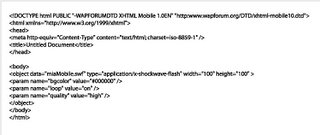 Richard say : that this doesn't work on all phones, only phones with the Flash player integrated as the plug-in, such as most Japanese i-mode handsets and according to the Nokia emulator at least, the new wave of Series 60 (ed 3) phones soon to be released. On our developer installs this still prompts us to click the Flash movie to open it.
So i go through googgle to find help.It took me to Richard page.Nice tips of using Dreamweaver 8 to embedded flash file to specific type. It have capability to set page into XHTML mobile1.0.
And here are the tag ;
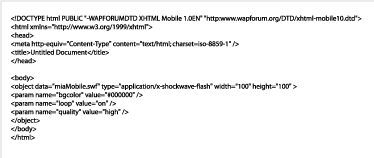 Richard say : that this doesn't work on all phones, only phones with the Flash player integrated as the plug-in, such as most Japanese i-mode handsets and according to the Nokia emulator at least, the new wave of Series 60 (ed 3) phones soon to be released. On our developer installs this still prompts us to click the Flash movie to open it.
01 March 2006
Application : Styleable LineChart Component for FlashLite 2.0
 Peter Baird, a user experience consultant from Adobe created a line chart class that can be used in your Flash Lite 2.0 app.
Simply import the class, instantiate it, and assign an array of data to it, and ta-da, you’ve got a line chart in your app.
A chart can be added to your FlashLite app with just a little code, as shown, where "myData" as an array of numbers of any length:
import com.adobe.charts.lineChart;
var myLineChart:lineChart = new lineChart();
myLineChart.chartData = myData;
myLineChart.drawChart();
including a sample fla that uses the class, and shows all the available style properties that can be customized.Click here to download the .as class, along with a sample .fla
28 February 2006
Web : Wanna try Flash Lite in Indonesia Handset?

I found interesting news regarding Flash Lite in Indonesia.How can we try those application in here?
So here it is....Sony Ericcson just released w900i to Indonesia.And the great thing is...there is Flash Lite embedded on this walkman phone series.They said Macromedia Flash Lite™ use for wallpaper, animation, menu and other impresive graphics element.
Well....when i check the price, it cost Rp. 6,200,000 :((...still to expensive for me.....
24 February 2006
Training Day 2
On the next day, I set up Flash MX 2004 to my computer's friend.
As Macromedia say, Flash Lite 1.x can only available to Flash MX 2004 and higher.
My friend told me she has installed Flash MX 2004 to her computer, then the problem appears.She can not find Flash Lite 1.1 on publish Flash option.
So anytime she publish the swf file, error message always shown.
"You should publish it to Flash 5 etc..."
When i checked the software,I found Flash MX 2004 Professional version 4.0.So i uninstalled it, and install to the machine with new version (ver. 7.2), and its works.
The only problem if we use some action scripts is, it need Flash Lite 1.1 to published.I dont find any problem when I developed a simpe wallpaper without any script embedded.
And what more interesting if we develop Flash Lite with Flash 8 is, we can find any devices to be tested.More complete action script help on panel, and also new features on publish option. There is Flash Lite 2.0 on it.
So my suggestion is....upgrade to Flash 8 to get more powerful support.Of course it need more space on your hardisk, and if you have computer with Windows 2000, you need to check Service Pack.It need Service Pack 4 to run.Or if you use Windows XP, you need to make sure your machine is using Service Pack 2.
As Macromedia say, Flash Lite 1.x can only available to Flash MX 2004 and higher.
My friend told me she has installed Flash MX 2004 to her computer, then the problem appears.She can not find Flash Lite 1.1 on publish Flash option.
So anytime she publish the swf file, error message always shown.
"You should publish it to Flash 5 etc..."
When i checked the software,I found Flash MX 2004 Professional version 4.0.So i uninstalled it, and install to the machine with new version (ver. 7.2), and its works.
The only problem if we use some action scripts is, it need Flash Lite 1.1 to published.I dont find any problem when I developed a simpe wallpaper without any script embedded.
And what more interesting if we develop Flash Lite with Flash 8 is, we can find any devices to be tested.More complete action script help on panel, and also new features on publish option. There is Flash Lite 2.0 on it.
So my suggestion is....upgrade to Flash 8 to get more powerful support.Of course it need more space on your hardisk, and if you have computer with Windows 2000, you need to check Service Pack.It need Service Pack 4 to run.Or if you use Windows XP, you need to make sure your machine is using Service Pack 2.
23 February 2006
Training Day 1
Its been pleasure for giving training to my friend.
She used to work with FlashMX 2004, now after some theory of Flashlite, she just can say "such a simple script to create great application" :D
We do have a good news from our partent.They planning to sell some wallpaper with Flashlite environment.So they asking me to find new partner to do so.
Our first application is wallpaper running on Flashlite 1.x.Then other projects come.
Cant wait to produce new application.
She used to work with FlashMX 2004, now after some theory of Flashlite, she just can say "such a simple script to create great application" :D
We do have a good news from our partent.They planning to sell some wallpaper with Flashlite environment.So they asking me to find new partner to do so.
Our first application is wallpaper running on Flashlite 1.x.Then other projects come.
Cant wait to produce new application.
Web:Hot viliv P1 30GB Portable Media Player
 Please take a good look....dont be fool with Sony PSP and iPod.
Specification :
- 30GB hard-drive,
- 4 inch 16:9 wide-screen with 480x272px TFT screen,
- Macromedia Flash player
- FM-Tuner,
- Voice and audio recording,
- Speaker,
- CF Slot,
- Video and Audio Out,
- 6 hour video viewing battery life and 11 hours for audio.
- The video player supports DivX, Xvid and MPEG1/2/4.
- The audio player supports MP3, WMA and OGG.
From the sales representation,they stated that they had produced a Korean language CDK (not found this online yet) and that there will be a FL2 version later this year
21 February 2006
Web:Final Results of Flashlite Poll

Today Flashlite Poll on Flashlite mailing list is closed.
Here are the result :
POLL QUESTION: What kind of flashlite content do you use to develop ?
CHOICES AND RESULTS
- games, 11 votes, 35.48%
- utilities, 19 votes, 61.29%
- ringtones, 0 votes, 0.00%
- animated wallpapers, 1 votes, 3.23%
- themes, 0 votes, 0.00%
And if i look individual votes list, there is my name there....the only person who voted for animated walpapers, hey....im the only one creating wallpaper with Flashlite...how silly i am :D
15 February 2006
Handset:SonyEricsson W950i with Flashlite Supported

Have you ever wonder to get Sony Ericsson mobile phone with FLashlite player on it? soon, you will get them. Sony Ericsson introducing W950i as their answer for Flashlite developers or user.
You can check the product here.
for Bahasa Indonesia version, you can read here
Application:FPS-Meter Lite for FlashLite developers
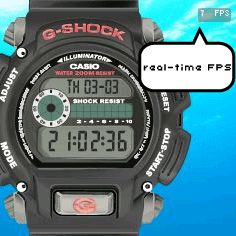 Faisal Iqbal post his email today on Flashlite Yahoo Groups a component for Flashlite 1.x as Valentine gifts.
It help developers to test Flashlite movie in emulator or device and show its FPS of last 10 frames.
You can download here
And, i've dragged it on my G-Shock application, and it work...great!....so now i can check my timing carefully then....
09 February 2006
F A Q
What it takes to create aplication working on Flash Lite?
- You can use Macromedia Flash MX 2004 or Flash 8, you can download the trial version here
How u will embed the flashlite application in the Mobile device. How
to transfer to the device?
- Bluetooth, IR, USB, Cable,Web link
Where can i find tutorial and some sample programs?
-http://www.macromedia.com/devnet/devices/ -http://www.macromedia.com/cfusion/exchange/index.cfm?view=sn310 -http://www.flashmobileforum.org/node/13
And vickymustdie on flash lite groups give more note about this :
Very first thing you need is Macromedia FLASHLITE Player
installed on your handset and also whether your Handset supports
Flash files or not. For which you need to check out the listing of
Macromedia Flashlite supported handsets
http://www.macromedia.com/mobile/supported_devices/handsets.html.
From the link, you have to confirm..
1) Whether your handset supports Flashlite Software from Macromedia.
2) If yes, which version of Flashlite is supported either Flashlite
1.0 or Flashlite 1.1.
3) Also need to verify the Supported Operators, ie. in case of you
downloading the files from online (and not from PC to Mobile using
Cable, Bluetooth etc.). Basically its GSM Handsets works all over
the world. But in the country like JAPAN, it supports NTTDocomo
Operators.
4) If all the above points turns positive for you, then you need to
go for Flashlite Player, which is free with some website or trial
packed, you need to buy it from Macromedia website :
http://www.macromedia.com/cfusion/store/index.cfm?store=OLS-
US&STOREREGION=us#loc=en_us&view=ols_prod&store=OLS-
US&category=/Software/Development/StandAlones/FlashLite&STOREREGION=u
s
5) Some Handsets comes with preinstalled Flashlite Player.
Making an Animation:
While making an animation for the mobile phones, you must take care
of file size and the size of the movie. The file size should not be
too high which will take down your handset memory while accessing
the flash applications. It will slow down your handset. The size of
the movie(screen) differs from handset to handset. In my case, i'll
take the movie size as "176 x 208" (Nokia 3230).
You'll need Flash 8 Professional Software for the animation (As it
includes Flash Lite emulator which lets you preview your content as
it will function on an handset. You must also take care of the
following rules for the production.
*** FLASH 4 SCRIPT
Flash Lite supports the Flash Player 4 version of the ActionScript
language for the Flashlite Applications. And so most of the Flash 8
commands and syntax are not supported with Flashlite.
*** FLASHLITE KEYS
Flash Lite supports the following keys on mobile devices:
Softkeys
Five-way keypad keys (Up, Down, Left, Right, and Select)
Left and Right soft keys
0-9, *, and # keys
*** KEY HANDLING
Assigning Key Handling to the Keypad Keys (eg.For "ENTER", you'll
press the Left/Right arrow key on your handset 's keypad.
*** TEXT
Flashlite supports all 3 text options. "STATIC", "DYNAMIC"
and "INPUT".
Using fonts available in device.
Rendering text.
*** SOUND
Flash Lite supports MIDI and MFi device audio formats as well as
native Flash sound compressed with PCM (or WAV), ADPCM, or MP3 audio
compression.
Event and Stream Sound.
Flash Lite does not support the Effect, Sync, and Edit options for
device sounds.
*** MOTION
For the Animation, Flashlite supports Vector quality at Low, Medium
and High Level.
Handset CPU Power Limitations for BITMAP and VECTOR images. Image
Compression.
You can learn more of Flashlite Development from Macromedia
Website : www.macromedia.com/software/flashlite/
Following this rules will help you make applications/games for
mobile devices.
Finally...
You need an installer in order to convert your .SWF files to .SIS
format (Supported by all the major handsets).
You can do that by using Softwares like SWF2SIS and MAKESIS.You can
download SWF2SIS software from http://www.blueskynorth.com/swf2sis/
and MAKESIS software from
http://www.symbian.com/developer/downloads/tools.html#makesis
After conversion of your file from .SWF to .SIS, you need to upload
your file online and then can download it from your Handset using
GPRS. Or You can either transfer it from PC to MOBILE using Data
Cable / Infrared / Bluetooth.
- You can use Macromedia Flash MX 2004 or Flash 8, you can download the trial version here
How u will embed the flashlite application in the Mobile device. How
to transfer to the device?
- Bluetooth, IR, USB, Cable,Web link
Where can i find tutorial and some sample programs?
-http://www.macromedia.com/devnet/devices/ -http://www.macromedia.com/cfusion/exchange/index.cfm?view=sn310 -http://www.flashmobileforum.org/node/13
And vickymustdie on flash lite groups give more note about this :
Very first thing you need is Macromedia FLASHLITE Player
installed on your handset and also whether your Handset supports
Flash files or not. For which you need to check out the listing of
Macromedia Flashlite supported handsets
http://www.macromedia.com/mobile/supported_devices/handsets.html.
From the link, you have to confirm..
1) Whether your handset supports Flashlite Software from Macromedia.
2) If yes, which version of Flashlite is supported either Flashlite
1.0 or Flashlite 1.1.
3) Also need to verify the Supported Operators, ie. in case of you
downloading the files from online (and not from PC to Mobile using
Cable, Bluetooth etc.). Basically its GSM Handsets works all over
the world. But in the country like JAPAN, it supports NTTDocomo
Operators.
4) If all the above points turns positive for you, then you need to
go for Flashlite Player, which is free with some website or trial
packed, you need to buy it from Macromedia website :
http://www.macromedia.com/cfusion/store/index.cfm?store=OLS-
US&STOREREGION=us#loc=en_us&view=ols_prod&store=OLS-
US&category=/Software/Development/StandAlones/FlashLite&STOREREGION=u
s
5) Some Handsets comes with preinstalled Flashlite Player.
Making an Animation:
While making an animation for the mobile phones, you must take care
of file size and the size of the movie. The file size should not be
too high which will take down your handset memory while accessing
the flash applications. It will slow down your handset. The size of
the movie(screen) differs from handset to handset. In my case, i'll
take the movie size as "176 x 208" (Nokia 3230).
You'll need Flash 8 Professional Software for the animation (As it
includes Flash Lite emulator which lets you preview your content as
it will function on an handset. You must also take care of the
following rules for the production.
*** FLASH 4 SCRIPT
Flash Lite supports the Flash Player 4 version of the ActionScript
language for the Flashlite Applications. And so most of the Flash 8
commands and syntax are not supported with Flashlite.
*** FLASHLITE KEYS
Flash Lite supports the following keys on mobile devices:
Softkeys
Five-way keypad keys (Up, Down, Left, Right, and Select)
Left and Right soft keys
0-9, *, and # keys
*** KEY HANDLING
Assigning Key Handling to the Keypad Keys (eg.For "ENTER", you'll
press the Left/Right arrow key on your handset 's keypad.
*** TEXT
Flashlite supports all 3 text options. "STATIC", "DYNAMIC"
and "INPUT".
Using fonts available in device.
Rendering text.
*** SOUND
Flash Lite supports MIDI and MFi device audio formats as well as
native Flash sound compressed with PCM (or WAV), ADPCM, or MP3 audio
compression.
Event and Stream Sound.
Flash Lite does not support the Effect, Sync, and Edit options for
device sounds.
*** MOTION
For the Animation, Flashlite supports Vector quality at Low, Medium
and High Level.
Handset CPU Power Limitations for BITMAP and VECTOR images. Image
Compression.
You can learn more of Flashlite Development from Macromedia
Website : www.macromedia.com/software/flashlite/
Following this rules will help you make applications/games for
mobile devices.
Finally...
You need an installer in order to convert your .SWF files to .SIS
format (Supported by all the major handsets).
You can do that by using Softwares like SWF2SIS and MAKESIS.You can
download SWF2SIS software from http://www.blueskynorth.com/swf2sis/
and MAKESIS software from
http://www.symbian.com/developer/downloads/tools.html#makesis
After conversion of your file from .SWF to .SIS, you need to upload
your file online and then can download it from your Handset using
GPRS. Or You can either transfer it from PC to MOBILE using Data
Cable / Infrared / Bluetooth.
26 January 2006
Web:DoCoMo starts to sell 3G FOMA mobile phones with Windows Mobile 5 OS
Last week I heard news from my friend in Japan about Japan's operator that they no longer market their handset with their own OS.It start this year on 2006.I didnt think that would be problem for Flash lite developer so far....until....
I just read this article :
DoCoMo quits FlashLite to sell Windows OS phones
I really want to know what will happen next. On Dec '05, i still have possibilities to develope some wallpaper in Flash lite environmnet. I hope Windows Mobile 5 OS be equipped with Flash lite just like some operators in Japan does.
I just read this article :
DoCoMo quits FlashLite to sell Windows OS phones
I really want to know what will happen next. On Dec '05, i still have possibilities to develope some wallpaper in Flash lite environmnet. I hope Windows Mobile 5 OS be equipped with Flash lite just like some operators in Japan does.
24 January 2006
Which handsets are certified to support Flash Lite 2?
Today's supported handsets include:
- Nokia 3230
- Nokia 6260
- Nokia 6620
- Nokia 6630
- Nokia 6670
- Nokia 6680
- Nokia 6681
- Nokia 6682
- Nokia 7610
- Nokia N70
- Nokia N90
Check back often for updates, as we continue to certify new devices. See the detailed list of Flash Lite supported devices.
What Is Flash Lite?

Flash Lite is the Flash technology specifically developed for mobile phones and consumer electronics devices. Flash Lite dramatically accelerates the delivery of rich content and browsing, and customized user interfaces. Designers and developers now have a new level of expressiveness, efficiency and interactivity for content creation.
Flash Lite has seen explosive adoption by OEMs, operators and developers in Japan and Asia, and is quickly growing worldwide. This growth is driven by the mature Flash authoring environment and rendering engine that delivers enhanced content and browsing, customized UI & a rich mobile experience across devices.
23 January 2006
Coding : Best Practice for Key Detection in Flash Lite 2
Tips using key Detection from luar Using Button
In Flash Lite 1.1, if we want to detect a key press (single press or continuous press), we need to attach the code to a button:
keyPress “” {
no += 1;
}
In Flash Lite 2, we can use back modern ActionScript, use Movie Clip or Object to do the key detection, for example:
Using Movie Clip as Key Listener
mc.onKeyDown = function(){
switch(Key.getCode()) {
case Key.UP :
no += 1;
break;
}
};
Key.addListener(mc);
Using Object as Key Listener
obj = new Object();
obj.onKeyDown = function(){
switch(Key.getCode()){
case Key.UP:
no += 1;
break;
}
}
Key.addListener(obj);
However, using key listener has a side effect, you cannot detect continuous key press (press the key without release). If you want to detect continuous key press, you need to use an
MovieClip.onEnterFrame:
mc.onEnterFrame = function(){
if(Key.isDown(Key.UP)){
no += 1;
}
};
//Key.addListener(obj);
By the way, I find the Flash Lite 2 emulator is even worse than Flash Lite 1.1 emulator because the latter one support pressing keyboard for testing (single press or continuous press), no need to use the mouse to click the phone button.
Here is the summary of the above testing:
In Flash Lite 1.1, if we want to detect a key press (single press or continuous press), we need to attach the code to a button:
keyPress “
no += 1;
}
In Flash Lite 2, we can use back modern ActionScript, use Movie Clip or Object to do the key detection, for example:
Using Movie Clip as Key Listener
mc.onKeyDown = function(){
switch(Key.getCode()) {
case Key.UP :
no += 1;
break;
}
};
Key.addListener(mc);
Using Object as Key Listener
obj = new Object();
obj.onKeyDown = function(){
switch(Key.getCode()){
case Key.UP:
no += 1;
break;
}
}
Key.addListener(obj);
However, using key listener has a side effect, you cannot detect continuous key press (press the key without release). If you want to detect continuous key press, you need to use an
MovieClip.onEnterFrame:
mc.onEnterFrame = function(){
if(Key.isDown(Key.UP)){
no += 1;
}
};
//Key.addListener(obj);
By the way, I find the Flash Lite 2 emulator is even worse than Flash Lite 1.1 emulator because the latter one support pressing keyboard for testing (single press or continuous press), no need to use the mouse to click the phone button.
Here is the summary of the above testing:
| Continuous Pressing Detecting Method | Press without Release in Handset | Press phone button without Release | Press the key in the PC keyboard without Release | ||
| FL 1.1 Emulator | FL 2 Emulator | FL 1.1 Emulator | FL 2 Emulator | ||
| Button | Support (Slower) | Not Support | Not Support | Support | Not Support |
| Object | Not Support | N/A | Not Support | N/A | Not Support |
| Movie Clip | Not Support | N/A | Not Support | N/A | Not Support |
| Movie Clip onEnterFrame | Support (Faster) | N/A | Support | N/A | Not Support |
Flash Lite 1.1 and 2.0 installation conflict
Alessandro posted on the Yahoo Flash Lite User Group to install Flash Lite 2.0 on a phone which had already Flash Lite 1.1 installed.
A workaround could be the following (I did not try but thoretically should work):
- Unsis one of the players on your PC
- create a pkg file
- replace the UID with another one and make any necessary changes to file names)
- create a SIS using makesis
- try to install
Alessandro
18 January 2006
Play, send your score & Win

This is one easy way to get IPod Nano with play Flashlite Game on Your handset.
The aim of this game is to avoid contact with the crazy virulent chicks and to get hold of maximum amount of anti-flu vials.
By submitting your scores the best palyers will have the chanc to receive amazing gifts.
The game is played with up/down keys.
Are you ready? get start with click here.
17 January 2006
Coding : Creating Trials for Flash Lite Apps (Part II)
Another tips from Richard Leggett in creating a 10 day trial Flash Lite application.
In Flash Lite 2.0, we can do this with Local Shared Objects, this is also great to keep the information from prying eyes as you have to know where to look for the SO's in order to try and crack them, the down side is that a little bit of digging a while back showed they look fairly similar (if not the same) as desktop Flash Player SO's and therefore there are already tools available to read them. Either way, they are a boon to Flash Lite development for many other reasons.
However, we aren't able to use SO's in Flash Lite 1.1, so we are going to use a very simple EXE bundled with the app to write to and update a text file, "config.dat".
The first step is to create a new Flash Lite 1.1 FLA, and create a sub-folder in it's directory called "config". Into this we put our EXE, Christian Halbach's flash2file (for which the source is available), and a plain text file named config.dat, which contains the following text:
uses=295 You might think that it's strange to set the number of uses to 295 to start, but this is because we are piping that number through a formula to figure out the real number:
Figure to store = 300 - (3n^2 + 5) Where n is equal to the number of uses so far. So with that in mind, we can visualise a table to suit:
| Number of uses: | Figure to store: |
| 0 | 295 |
| 1 | 292 |
| 2 | 283 |
| 3 | 268 |
| 4 | 247 |
| 5 | 220 |
| 6 | 287 |
| 7 | 148 |
| 8 | 103 |
| 9 | 52 |
Now that we can "hide" our number of uses in a not so obvious manner, we can go about hooking up our Flash Lite app with flash2file to read and write this value. On frame 1 I have the following code:
fscommand2("SetQuality", "high");

// Load in number of uses so far
uses = -1;
loadVariables("config.dat", "/");
On frame 2 the following:
// Loop until number of uses has loaded
if(uses != -1)
{
// Convert figure to useable value
// i.e. find x where x = 300 - (3n^2 + 5)
numUses = 300 - uses;
numUses = (numUses-5)/3;
numUses = (numUses==0) ? 0 : int(Math.sqrt(numUses));

// Display usage information
gotoAndStop(5);
}
else gotoAndStop(2);
...and finally on frame 5:
// Display number of uses
usesTxt = numUses add " uses so far";
if(numUses>=9) usesTxt = "Demo expired";

// Path to flash2file.exe
appname = "c:/documents/flash/flash2file.exe";

// Path to the file to write to
path = "c:/documents/flash/config.dat";

// Update numUses
numUses++;
uses = 300 - ((numUses*numUses)*3 + 5);

// Text to write to file
txt = "uses=" add uses;

// Update number of uses to text file
argument = appname add "," add path add "," add txt;
fscommand("Launch", argument);
As you've probably guessed, I've got a textfield with a variable name of "usesTxt", and not much else apart from the code. That's it. Now you could either exit the app, or display a nag if numUses is >= your desired figure.
Now we are ready to copy it all to the phone in order to allow flash2file to do its job... So our directory structure that we will mirror on the phone is as such:
- 10daytrial.swf
- config.dat
- flash2file.exe
Finally, copy the SWF and config folder to the phone's c:\documents\flash\ folder, and test the SWF. Ideally you would package this up as a SIS installer and get it to install to a non-public folder to better hide your config file.
You can download the finished project here - I have not included flash2file.exe as Christian has requested that you contact him for the latest version.
Summary:
This method is inherently insecure. The reason for this is that we are using some incredibly weak protection, simply using ord() and chr() to mask the number of uses is not really acceptable, but even if you did take the time to port md5 to Flash Lite 1.1 the SWF is still accessible, decompilable and crackable. There is nothing we can do about this, it happens on the web all the time. On the web we like to let the server deal with the security. On a phone we can do the same, but that might annoy the end user, so instead we need to look forward to some DRM integration and standardisation across the handset manufacturers in order for Flash Lite to leverage this functionality. One plus point is that mobile content is dirt cheap, it has to be; and it is therefore not usually worth the time it takes to crack even the simplest form of protection we might employ. The ringtones and mobile downloads industry is still booming even though people are able to bluetooth items for free.

Note if you are using the Flash Lite 2.0 player:
If using the FL2.0 player you will need to change the paths to c:\Nokia\Others or e:\Others for the Flash Lite player to pick up your SWF and for the app to function correctly.
Nokia 6125 With FlashLite on Sale
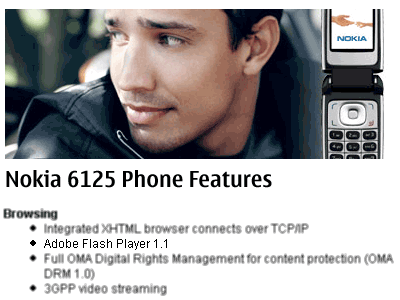
As its report on Nokia, they launched 6125 with with Flash Lite pre-installed.
And because mobile phones are about so much more than making calls, you can set it to flight mode and use the calendar, music player, or games while you're in the air.
Bad news is, they only sell it on Europe, Middle East, Africa :(
13 January 2006
Coding : To Center Loaded Image Tips
We have to wait until the image is fully loaded before you can get it's dimensions, (so that is the onLoad handler in Flash Lite 2, with Flash Lite 1.1 you'll have to embed the image in a swf and use the _framesloaded and _totalframes to check if it is fully loaded). With that done you can access the _width and _height and use:
my_mc._x = Stage.width/2 - my_mc._width/2;
my_mc._y = Stage.height/2 - my_mc._height/2
Coding:Creating Trials for Flash Lite Apps
This is Richard Legger answer for David Williams question on the Flash Lite Yahoo Group asks, how do I make time limited trials in Flash Lite 1.1?
There are a few options to consider:
- Time out after a few minutes each time.
- Time out after X days and never run again.
- Lose functionality after X days or weeks.
Unfortunately it is getting late and I have work to do, so I've only got time to cover the first in that list, but I'm still writing my book on Flash Lite which is due March, and that will have detailed instructions and samples for each - end plug.
So the code for the first example is very simple, and I've included an FLA which contains a movie clip in the library that you can simply drag into your game or app to make sure it exits 3 minutes after starting up.
First up, create a new Flash document using a mobile template, and create a new movie clip, called "TrialMaker". Edit that movie clip and type the following code on frame 1:
timeout = 180;
startTime = getTimer();
Next up, create a keyframe on frame 10, and add the following:
if(getTimer()-startTime > timeout*1000)
{
fscommand("quit");
}

gotoAndPlay(2);
I chose frame 10, as this creates an automatic loop, a loop that doesn't execute code all that often thus having a negligable impact on your game execution speed whilst remaining fairly accurate (which we all know is essential for Flash Lite games). You can modify the value of timeout to any number of seconds you wish, I chose 3 minutes at Davids request.
If you are lucky enough to be using Flash Lite 2, you can simply add the following code to frame 1:
setInterval(function() { fscommand("quit"); }, 180000);
12 January 2006
Multi User Game
Wanna try flash game for multi user?
You can dopwnload here :
http://www.rawfish-software.com/index.php
You can dopwnload here :
http://www.rawfish-software.com/index.php
Set Numeric Input
This is one trick to set up our form variable into numeric.
The fscommand2 is SetInputTextType, and it works on 6620.
You have to be sure that "variableName" matches the variable that you've
assigned to the text field, e.g. if your text field property has the
"Var:" property set to input1, you should use
fscommand2("SetInputTextType", "input1", "Numeric");
The fscommand2 is SetInputTextType, and it works on 6620.
You have to be sure that "variableName" matches the variable that you've
assigned to the text field, e.g. if your text field property has the
"Var:" property set to input1, you should use
fscommand2("SetInputTextType", "input1", "Numeric");
11 January 2006
Flash2File.exe
For people who don't want to compile the project, but need the .exe:
Here it is.
It can be packaged with the flash files into one .sis.
Here it is.
It can be packaged with the flash files into one .sis.
09 January 2006
Button Skema
Using Button
In Flash Lite 1.1, if we want to detect a key press (single press or continuous press), we need to attach the code to a button:
Using Movie Clip as Key Listener
Using Object as Key Listener
Or you can download here
Source : http://www.luar.com.hk/flashbook/archives/001320.php
In Flash Lite 1.1, if we want to detect a key press (single press or continuous press), we need to attach the code to a button:
on (keyPress "") {
no += 1;
}
In Flash Lite 2, we can use back modern ActionScript, use Movie Clip or Object to do the key detection, for example:no += 1;
}
Using Movie Clip as Key Listener
mc.onKeyDown = function() {
switch (Key.getCode()) {
case Key.UP :
no += 1;
break;
}
};
Key.addListener(mc);
switch (Key.getCode()) {
case Key.UP :
no += 1;
break;
}
};
Key.addListener(mc);
Using Object as Key Listener
obj = new Object();
obj.onKeyDown = function() {
switch (Key.getCode()) {
case Key.UP :
no += 1;
break;
}
};
Key.addListener(obj);
However, using key listener has a side effect, you cannot detect continuous key press (press the key without release). If you want to detect continuous key press, you need to use an MovieClip.onEnterFrame: obj.onKeyDown = function() {
switch (Key.getCode()) {
case Key.UP :
no += 1;
break;
}
};
Key.addListener(obj);
mc.onEnterFrame = function() {
if (Key.isDown(Key.UP)) {
no += 1;
}
};
// Key.addListener(obj);
By the way, I find the Flash Lite 2 emulator is even worse than Flash Lite 1.1 emulator because the latter one support pressing keyboard for testing (single press or continuous press), no need to use the mouse to click the phone button.if (Key.isDown(Key.UP)) {
no += 1;
}
};
// Key.addListener(obj);
Or you can download here
Source : http://www.luar.com.hk/flashbook/archives/001320.php
FL 1.1 dan Unicode
Flash Lite 1.1 tidak mendukung Unicode, kita tidak bisa melihat non-English (Latin) denga tipe data dinamik di Flash Lite konten. Berbeda dengan Flash Lite 2.0 . Bagaimanapun, dukungan kemampuan ini terbatas untuk kriteria tertentu, misalnya,bila ingin memperlihatkan dinamik dengan karakter berbahasa Cina, handset kita mesti diseting dengan tampilan Chinese terlebih dahulu.




06 January 2006
Daftar Handset yang support FL 2.0
Berikut daftar handset nokia yang mendukung Flashlite Player 2.0 :
- Nokia 3230
- Nokia 6260
- Nokia 6620
- Nokia 6630
- Nokia 6670
- Nokia 6680
- Nokia 6681
- Nokia 6682
- Nokia 7610
- Nokia N70
- Nokia N90
03 January 2006
Flashlite 2.0 telah dirilis
Resmi- Flash Lite 2 Update for Flash Professional 8 sekarang tersedia untuk didownload di Adobe (formerly Macromedia) Labs website.
Update ini akan menambahkan fitur resmi Flash Lite 2-di Flash Professional 8 yang telah terinstall hingga kita bisa memulai kesibukan segera. Jika kita beruntung melihatnya sebelum liburan, Flash Lite 2.0 mobile player sepertinya masih tersembunyidi Macromedia.com online store. Selamat mencoba!
Update ini akan menambahkan fitur resmi Flash Lite 2-di Flash Professional 8 yang telah terinstall hingga kita bisa memulai kesibukan segera. Jika kita beruntung melihatnya sebelum liburan, Flash Lite 2.0 mobile player sepertinya masih tersembunyidi Macromedia.com online store. Selamat mencoba!
FlickrMobile: A Flash Lite 2 Application
Punya account di Flickr?, terus pengen juga cek account kita ataupun punya orang lewat aplikasi flashlite 2.0?, gampang....tinggal download aja aplikasi ini, terus jalanin di Hp.
Moga membantu.
Moga membantu.
28 December 2005
Iriver U10 CDK in English
Bagi developer yang ingin mengembangkan konten untuk Iriver U10, kini tersedia CDK dalam Bahasa Inggris.
Untuk mendapatkannya, bisa diakses di :
http://www.maxmediacorp.com/u10/u10_CDK_English.pdf
Untuk mendapatkannya, bisa diakses di :
http://www.maxmediacorp.com/u10/u10_CDK_English.pdf
I-Mode Docomo In English Version
On this page, you will find an outline of the possibilities offered by Macromedia® Flash® for i-mode mobile phones, plus an explanation about how to distribute contents created with it to i-mode compatible phones, and a summary of how to use them
click here for detail
click here for detail
21 December 2005
JPG to SWF Converter
Diambil dari artikel milik Marco Casario berikut ada beberapa software jpg to swf converter.
Uniknya ada pula PHP-wrappers yang secara dinamis memunculkan images ke dalam FlashLite dan mengubah JPEG yang berlokasi di server ke dalamSWF.
Software berikut adalah gratisan:
FlashWriter Toolkit
PHP MING
http://opaque.net/ming/or
http://www.neuralust.com/~mingdocs/or
LIBSWF
http://www.php.net/manual/en/ref.swf.php
PHP SWF JPG
http://www.foxaweb.com/php_swf_jpg/
JPG2SWF
http://low.fr.st/jpg2swf/
FreeMovie Library
http://sourceforge.net/projects/freemovie/
Uniknya ada pula PHP-wrappers yang secara dinamis memunculkan images ke dalam FlashLite dan mengubah JPEG yang berlokasi di server ke dalamSWF.
Software berikut adalah gratisan:
FlashWriter Toolkit
PHP MING
http://opaque.net/ming/or
http://www.neuralust.com/~mingdocs/or
LIBSWF
http://www.php.net/manual/en/ref.swf.php
PHP SWF JPG
http://www.foxaweb.com/php_swf_jpg/
JPG2SWF
http://low.fr.st/jpg2swf/
FreeMovie Library
http://sourceforge.net/projects/freemovie/
20 December 2005
Masalah Instalasi FLash Lite di Nokia Terbaru
Pemberitahuan ini didapat dari blog milik Richard Leggett .
Ini menyangkut seri terbaru Nokia N70 and Flash Lite. Yakni instalasi aplikasi tertentu kedalam handphone. Nokia seri 60 tidak mengijinkan hal seperti ini secara default, termasuk Flash Lite 1.1 player. Kita akan mendapatkan pesan error sebagai berikut : "installation security error".
Untuk mengatasi hal ini gunakan mekanisme berikut :
Buka 'Tools > Manager > Options > Settings' dan ubah Software installation' > "On".
Ini menyangkut seri terbaru Nokia N70 and Flash Lite. Yakni instalasi aplikasi tertentu kedalam handphone. Nokia seri 60 tidak mengijinkan hal seperti ini secara default, termasuk Flash Lite 1.1 player. Kita akan mendapatkan pesan error sebagai berikut : "installation security error".
Untuk mengatasi hal ini gunakan mekanisme berikut :
Buka 'Tools > Manager > Options > Settings' dan ubah Software installation' > "On".
16 December 2005
U10 Korean Site

Sebuah situs Korea Early adopter's world merilis artikel tentang U10
Flash games.Berikut beberapa screenshots dari gem dengan U10.
Berita selengkapnya ada disini.
15 December 2005
Artikel ini menjelaskan bahwa Flash screensavers adalah bagian dari distribusi mobile music untuk layanan KDDI.Paket ini termasuk rekaman artis berwujud musik video, full song ringer and Flash screensaver.
Paket yang disebut "WA-MO" ini hanya dapat didownload oleh pelanggan KKDI untuk Warner dengan charging perdownloadnya mencapai 200 hingga 500 "point" (atau US$ 1.67 hingga US$4.20). Layanan ini hanya tersedia untuk pelanggan KDDI pengguna handset 3G.
Berita lebih lanjut disini.
Paket yang disebut "WA-MO" ini hanya dapat didownload oleh pelanggan KKDI untuk Warner dengan charging perdownloadnya mencapai 200 hingga 500 "point" (atau US$ 1.67 hingga US$4.20). Layanan ini hanya tersedia untuk pelanggan KDDI pengguna handset 3G.
Berita lebih lanjut disini.
14 December 2005
Lady Calendar now Online
 Terima kasih untuk Alex yang memenuhi janjinya untuk menyebarluaskan file flashlite yang berhasil memenangkan kontes MMobileUG Flash Lite Application.
Seperti yang dikatakan dalam websitenya :
"LadyCalendar" is an application for ladies... :)
It's purpose is to calculate ovulation and menstrual days.
You can save data for up to three users.
Download SIS installer file for your mobile :
LadyCalendar.zip
13 December 2005
Winner of the Flash Lite Application contest
Berikut adalah daftar pemenang lomba MMobileUG Flash Lite Application yang dimenangkan oleh Alen yang merancang sebuah aplikasi yang unik.
Keterangan pemenang bisa dibaca disini
Keterangan pemenang bisa dibaca disini
02 December 2005
Bergabunglah dengan Program Macromedia Mobile Developer
Program Macromedia Mobile Developer dibentuk untuk mendukung para pengembang wireless dan kontent lain yang tertarik untuk memobilisasi aset Flash dan non-Flash lainnya. Dengan program ini pengembang memiliki akses langsung ke bagian service, informasi, dan mendukung membantu desain, mengembangkan, dan memasarkan apliasi Flash dan konten untuk wireless mobile devices.
01 December 2005
Remote S60
 Buat yang sering melakukan presentasi, ada baiknya ada mengecek yang satu ini.
Remote S60.
Alat ini memiliki kemampuan untuk melakukan remote terhadap perangkat telepon genggam, misalnya dari Nokia 3650 atau 7650 hanya dari desktop PC.Artinya untuk melalukan navigasi ke HP kita, cukup gunakan keyboard dari PC.Kebayang kan kalo kita suatu saat perlu memperlihatkan aplikasi di HP kita kepada audience.Atau tak usah jauh-jauh lah, misalnya kita perlu kirim sms panjang, atau perlu kirim MMS, tangan kita akan lebih mudah menyiapkannya dengan keyboard di PC.
Remote S60 sangat berguna untuk:
- mengatur dengan mudah Nokia 3650/7650
(misalnya add/edit contacts, bookmarks; configure settings, dll.) - menulis dan mengirim pesan SMS
- membaca/mengirim email dari 3650/7650 di PC
- melakukan pemanggilan/menerima telepon dari PC
- mengambil screenshots atau merekam video AVI
- melakukan pelatihan atau presentasi aplikasi di Nokia 3650/7650 via sorotan
- Melihat tampilan kamera dari PC.
Aplikasi lain yang dapat digunakan untuk keperluan serupa adalah : ImageExpo ,dari Sysopendigia.
Bedanya aplikasi ini menggunakan Internet (TCP/IP), Bluetooth or USB untuk berkomunikasi dengan perangkat HP.
Subscribe to:
Posts (Atom)
PPL IAIN Syekh Nurjati Cirebon
Jika ditanya apa yang kau suka dari kehadiran mereka? Mereka punya jawabannya : semangat yang tinggi dengan keingintahuan yang tipikal mahas...
-
 Jika ditanya apa yang kau suka dari kehadiran mereka? Mereka punya jawabannya : semangat yang tinggi dengan keingintahuan yang tipikal mahas...
 -
 Istriku berteriak kegiarangan di Whatsapp. Jumat itu, sedari pagi seperti yang ia janjikan, ia bergegas menuju ke kantor pos di Sarijadi. ...
 -
 Ini adalah gambar permunculan ID-Card yang sedianya akan digunakan di lingkungan Pondok Pesantren Bayt al-Qur'an Pondok Cabe Tangerang. ...