Shortly after Adobe announced the latest version of flash, a leading graphics companies like NVIDIA, ATI and Intel have entered their names to support these technologies. Do not want to miss, Broadcom also helped provide support to the device hardware.
As quoted from liliputting, Thursday (19/11/2009) video accelerator Broadcom is not a graphics card that is 'standalone'. Thus, users do not need to buy it separately.
Although not dedicated to playing games, but the graphics card is claimed to optimize the quality of High Definition video class at netbook. So the video is showing would have outstanding qualities.
The first netbook to use this graphics card is the HP Mini 110. But what happened, some owners of these netbooks instead 'mempreteli' this graphics card to be installed on the netbook brands.
In the Adobe forum and MyHPMini, mentioned also that with a combination of Adobe Flash Player 10.1 with this graphics card, it can optimize the embedded Atom processor in a netbook for smooth high-resolution video playback.
Showing posts with label Adobe. Show all posts
Showing posts with label Adobe. Show all posts
19 November 2009
18 November 2009
Adobe Flash Coming Soon to Mobile
Today, Adobe released the prerelease version of Flash Player 10.1 for computers and netbooks running Windows, Mac OS X and Linux (linux). Adobe has also updated some of its mobile demo videos and documents and it looks like a beta of Flash Player 10.1 for the Palm Pre is right around the corner.
Flash Player 10.1 utilizes GPU and hardware acceleration for H.264 and AAC media whenever possible. The big hurdle with Flash on mobile or low-powered devices is that Flash isn’t compiled to offload the decoding tasks to the graphics processor, which can often do the heavy lifting with better performance with with less power consumption.
Even if you aren’t running a netbook or lower-powered system, you might just benefit from downloading Flash Player 10.1 prerelease. Mac OS X users have had a lot of issues with Flash slowdowns — even on the fastest machines. My own iMac with an Intel i7 and 8 GB of RAM still suffers more slowdowns than it should. The prerelease reduces CPU usage to a significant degree, according to AnandTech’s benchmarks and I saw immediate improvements in Hulu (Hulu) full-screen playback.
It was great news!
Flash Player 10.1 utilizes GPU and hardware acceleration for H.264 and AAC media whenever possible. The big hurdle with Flash on mobile or low-powered devices is that Flash isn’t compiled to offload the decoding tasks to the graphics processor, which can often do the heavy lifting with better performance with with less power consumption.
Even if you aren’t running a netbook or lower-powered system, you might just benefit from downloading Flash Player 10.1 prerelease. Mac OS X users have had a lot of issues with Flash slowdowns — even on the fastest machines. My own iMac with an Intel i7 and 8 GB of RAM still suffers more slowdowns than it should. The prerelease reduces CPU usage to a significant degree, according to AnandTech’s benchmarks and I saw immediate improvements in Hulu (Hulu) full-screen playback.
It was great news!


19 October 2009
Fake Adobe Flash Player Install - Don't Be Fooled
You are surfing along and when you land on a site that contains any type of flash movie (and some that don’t!), you get a popup box that says your Adobe Flash version is out of date and needs to be updated.
Since it appears real enough, and because most computer users know they have Adobe installed, many will click on it. Don’t. It is Malware.
Malware often use many techniques to manifest itself onto their host, including these fake warnings to update something on your computer. This piece of malware masquerades itself as a flash player plugin for the Firefox browser (detected by Sophos as Troj/FFSpy-A, and TrojanClicker.VB.395 as detected by TrojanHunter ).
To Repair Your Machine
Take these steps to clear your machine, and remember, a daily complete virus scan by reliable scanning software can save you a lot of grief.
First, since this is a FireFox Addon, open FireFox –> Tools –> Addons

You are looking for an addon that looks something like the one above. Remember it has undergone revisions over the years, so it might not appear exactly as shown. Uninstall this nasty little guy.
Next, the extension works in conjunction with a trojan executable. In the recent past it was smc.exe, though there are probably others by now. And if you are running SyGate as your firewall, smc.exe is a legitimate file! You will need an up to date virus and Trojan scan to remove the rest of the malicious software from your machine. TojanHunter is not a bad tool to add to your arsenal. You can download a free 30 day trial at that link.
To Determine Your Real Version Of Flash
When in doubt, you should always visit the Adobe site for your downloads. In fact, this is true for ANY legitimate software or extension you have installed. Just like the fake email’s from PayPal or your bank, don’t trust the direct link. Type it into the address bar or closely review the link you are about to click. It should not have any extra characters in the link (for example www.AdobeX.com).
To determine the exact version of the flash player you have installed on your computer, you can visit Adobe’s Version checker at http://www.adobe.com/software/flash/about/
Since it appears real enough, and because most computer users know they have Adobe installed, many will click on it. Don’t. It is Malware.
Malware often use many techniques to manifest itself onto their host, including these fake warnings to update something on your computer. This piece of malware masquerades itself as a flash player plugin for the Firefox browser (detected by Sophos as Troj/FFSpy-A, and TrojanClicker.VB.395 as detected by TrojanHunter ).
To Repair Your Machine
Take these steps to clear your machine, and remember, a daily complete virus scan by reliable scanning software can save you a lot of grief.
First, since this is a FireFox Addon, open FireFox –> Tools –> Addons

You are looking for an addon that looks something like the one above. Remember it has undergone revisions over the years, so it might not appear exactly as shown. Uninstall this nasty little guy.
Next, the extension works in conjunction with a trojan executable. In the recent past it was smc.exe, though there are probably others by now. And if you are running SyGate as your firewall, smc.exe is a legitimate file! You will need an up to date virus and Trojan scan to remove the rest of the malicious software from your machine. TojanHunter is not a bad tool to add to your arsenal. You can download a free 30 day trial at that link.
To Determine Your Real Version Of Flash
When in doubt, you should always visit the Adobe site for your downloads. In fact, this is true for ANY legitimate software or extension you have installed. Just like the fake email’s from PayPal or your bank, don’t trust the direct link. Type it into the address bar or closely review the link you are about to click. It should not have any extra characters in the link (for example www.AdobeX.com).
To determine the exact version of the flash player you have installed on your computer, you can visit Adobe’s Version checker at http://www.adobe.com/software/flash/about/
Flash is Belong to Adobe
So when Adobe contacted Envato, an Australian startup that operates a set of popular marketplaces for digital creative goods to change one of their marketplaces names, Envato had no choice. Envato operates a property called FlashDen, which sells Adobe Flash and Flex files like preloaders, galleries, site templates and utilities. Files are created and sold by a huge community of authors from all over the world.
Last week Adobe contacted Envato and asked Envato to change the name and URL of FlashDen so that it would no longer contain the term ‘Flash’, which is a registered trademark of Adobe. With little time, Envato changed the name from FlashDen to ActiveDen.
Seeing this change, we reached out to Collis Ta’eed, the CEO of Envato, and he mentioned that Envato received a letter from a law firm representing Adobe asking to change FlashDen’s name. Envato followed through, not wanting more legal problems with Adobe. Ta’eed also mentioned that “FlashDen” was filed as a trademark in Australia in January 2008 and entered on the Australian trademark register in August 2008. Envato is based in Melbourne, Australia.
Last week Adobe contacted Envato and asked Envato to change the name and URL of FlashDen so that it would no longer contain the term ‘Flash’, which is a registered trademark of Adobe. With little time, Envato changed the name from FlashDen to ActiveDen.
Seeing this change, we reached out to Collis Ta’eed, the CEO of Envato, and he mentioned that Envato received a letter from a law firm representing Adobe asking to change FlashDen’s name. Envato followed through, not wanting more legal problems with Adobe. Ta’eed also mentioned that “FlashDen” was filed as a trademark in Australia in January 2008 and entered on the Australian trademark register in August 2008. Envato is based in Melbourne, Australia.
26 November 2008
Trial Versions of Flash CS4 is Avalilable
Yes, by middle of this November, Adobe released Trial Version od Flash CS4. Now everyone can try it. This trial versions are available for both Mac and PC in the languages Dutch, English, French, German, Italian, Spanish and Swedish.

Click here to download the trial. Have fun!

Click here to download the trial. Have fun!
18 September 2008
Flash Lite 1.1 Player Error Messages
While you finish the rest of your flash lite application, sometime you keep press Ctrl+Enter to check your application on Flash Emulator. Once you have problem with those, you will see any error message that will appear on the emulator.
This can help you to get away from more problem when you test on real handset. Like when I try to place movie clip into movie clip with loadMovie(url,"some_mc");, I found problem on it.

It is said :
So what is Problem with content: 5 anyway?
Adobe developer center bring solution with describe all this code problem.
Here's a complete list of the "Problem with content: number" messages you may encounter, listed by error number:
1. Out of memory
2. Stack limit reached
3. Corrupt SWF data
4. ActionScript stuck
5. Infinite AS loop
6. Bad JPEG data
7. Bad sound data
8. Cannot find host
9. ActionScript error
10. URL too long
Usually after the Flash Lite 1.1 player prompts you with a message, you need to exit the player, relaunch it, and open the SWF file again.
This can help you to get away from more problem when you test on real handset. Like when I try to place movie clip into movie clip with loadMovie(url,"some_mc");, I found problem on it.

It is said :
Problem with content: 5 - Invalid ActionScript in SWF data.
So what is Problem with content: 5 anyway?
Adobe developer center bring solution with describe all this code problem.
Here's a complete list of the "Problem with content: number" messages you may encounter, listed by error number:
1. Out of memory
2. Stack limit reached
3. Corrupt SWF data
4. ActionScript stuck
5. Infinite AS loop
6. Bad JPEG data
7. Bad sound data
8. Cannot find host
9. ActionScript error
10. URL too long
Usually after the Flash Lite 1.1 player prompts you with a message, you need to exit the player, relaunch it, and open the SWF file again.
28 August 2008
Xuinet FlashR Developer Challenge Launched
Last few days ago, I got an email from Esther for the Xuinet team.
Here the content :
In conjunction with Adobe, Millennial and DeviceAnywhere, Xuinet is leading the search for the best in class mobile Flash application. $10,000 in cash and prizes are up for grabs for the most downloads and best in the following categories:
o Blogs, forums and social networks
o Fun-n-games
o Images/slide-shows
o Sports
o On-the-go-travel, weather, news, etc.
To participate, Flash developers simply download the SDK at www.xuinet.com, create their content and publish it to the Xuinet network to enter before November 3, 2008. Further details on the FlashR Developer Challenge can be found at www.xuinet.com/2008FlashR.
Here the content :
In conjunction with Adobe, Millennial and DeviceAnywhere, Xuinet is leading the search for the best in class mobile Flash application. $10,000 in cash and prizes are up for grabs for the most downloads and best in the following categories:
o Blogs, forums and social networks
o Fun-n-games
o Images/slide-shows
o Sports
o On-the-go-travel, weather, news, etc.
To participate, Flash developers simply download the SDK at www.xuinet.com, create their content and publish it to the Xuinet network to enter before November 3, 2008. Further details on the FlashR Developer Challenge can be found at www.xuinet.com/2008FlashR.
30 July 2008
Streaming Live Video with Flash Media Server

Having thought of using Webcam and compile it as part of Flash project? Student of Tom Green do. In fact, you should come and see what he doing to make it happened.
What we need, just do the following:
- Use a webcam and Flash Media Encoder 2.5 to create a stream.
- Use the FLVPlayback component and one line of ActionScript to feed that stream into a browser.
There are 6 articles for this :
Part 1: Installing Flash Media Server 3
Part 2: Streaming video with Flash Media Server 3
Part 3: Using ActionScript 3.0 with Flash Media Server 3
Part 4: Streaming audio through Flash Media Server 3
Part 5: Security features in Flash Media Server 3
Part 6: Streaming live video with Flash Media Server 3
Interesting huh? go and get it via Adobe Developer Center.
23 July 2008
Flash Lite UI Component Examples
Here are some nice and lightweight components directly from the Experience Design team at Adobe Mobile and Devices.
What will you get from them:
* Discover how to create low memory yet rich components
* List, Slider, Tile, NavModel and Gapper components for Flash Lite 2.x/3.x
* Carousel, Menu, Story and scroll bars in Flash Lite 1.1
* Key Handling for Flash Lite 1.1 and Flash Lite 2.x/3.x
* Image Handling, loading and unloading etc (TileMenu)
* Creating device UI and multi-screen applications (NavModel)

Grab this here.
What will you get from them:
* Discover how to create low memory yet rich components
* List, Slider, Tile, NavModel and Gapper components for Flash Lite 2.x/3.x
* Carousel, Menu, Story and scroll bars in Flash Lite 1.1
* Key Handling for Flash Lite 1.1 and Flash Lite 2.x/3.x
* Image Handling, loading and unloading etc (TileMenu)
* Creating device UI and multi-screen applications (NavModel)

Grab this here.
25 June 2008
Device Profile Update #6
Flash are listening to their user. Based on community feedback and data from their partners, they just released the Device Profile Update #6 for Adobe Device Central CS3.

Picture taken from : http://www.adobe.com/products/creativesuite/devicecentral/features/.
There 63 new device profiles, it would be great option to publish flash lite application. Not just the profiles, it also includes important improvements to existing profiles.
So how many devices profiles you can select? almost 460 over!. And what would a Nokia N95 8GB user love to hear is, it now allocating 4mb heap memory. Get here for update.

Picture taken from : http://www.adobe.com/products/creativesuite/devicecentral/features/.
There 63 new device profiles, it would be great option to publish flash lite application. Not just the profiles, it also includes important improvements to existing profiles.
So how many devices profiles you can select? almost 460 over!. And what would a Nokia N95 8GB user love to hear is, it now allocating 4mb heap memory. Get here for update.
18 June 2008
Acrobat 9 with Full Flash Player Built In
Acrobat, a genuine name all people known as Adobe product, now has a full Flash Player built in. I think it just about time, when Adobe acquire Macromedia, many Adobe product support what Macromedia's offer.
And so is Adobe Acrobat with latest version, Acrobat 9. Let's say if I working on project with several document, like word document, PDF, Flash file, you can combine it all together as a single PDF portfolio. Thanks to PDF Portfolios feature, that make it all happened.
While you working with Microsoft Office Word 2007, with Adobe Buzzworld all be possibleto be online word processor that can read and write in the new docx format.
I believe the upcoming Adobe Reader 9 will be intgrated with Acrobat so you can share PDF files on web with easily.
And so is Adobe Acrobat with latest version, Acrobat 9. Let's say if I working on project with several document, like word document, PDF, Flash file, you can combine it all together as a single PDF portfolio. Thanks to PDF Portfolios feature, that make it all happened.
While you working with Microsoft Office Word 2007, with Adobe Buzzworld all be possibleto be online word processor that can read and write in the new docx format.
I believe the upcoming Adobe Reader 9 will be intgrated with Acrobat so you can share PDF files on web with easily.
19 May 2008
Astro, Adobe® Flash® Player 10
I have not lucky yet to give Adobe Flash 10 a try. I do believe it has more power to present better application. It come to be great experience to see its new expressive features.
It even have a code-name for it, Astro. From what I have heard from official site, some of the key features is easily transform and animate any display object through 3D, the ability to Create and share your own portable filters, blend modes, and fills using Adobe Pixel Bender™. Maybe you have heard Pixel Bender as Hydra, which can use as a filter factory, a way to create effects just in time. The combination of using the graphics card to do the calculations and not the processor come as great aspect.
You can check the release note for more information.
It even have a code-name for it, Astro. From what I have heard from official site, some of the key features is easily transform and animate any display object through 3D, the ability to Create and share your own portable filters, blend modes, and fills using Adobe Pixel Bender™. Maybe you have heard Pixel Bender as Hydra, which can use as a filter factory, a way to create effects just in time. The combination of using the graphics card to do the calculations and not the processor come as great aspect.
You can check the release note for more information.
14 January 2008
Web : FL 2.1 Developer Edition Installer
For some reason, you would like to have Flash Lite 2.1 developer installer. But you may get lost when you going to :
http://www.adobe.com/devnet/devices/
If so, you can grab them at :
http://www.adobe.com/devnet/devices/flashlite.html
With many links of it. You can also get many resources on how to creating SIS file, or extending Flash Lite 2.1 features with flyer.
http://www.adobe.com/devnet/devices/
If so, you can grab them at :
http://www.adobe.com/devnet/devices/flashlite.html
With many links of it. You can also get many resources on how to creating SIS file, or extending Flash Lite 2.1 features with flyer.
21 December 2007
New build of Adobe Media Player on Adobe Labs
Adobe yesterday posted a new build of Adobe Media Player on Adobe Labs. User Interface is about the same. Only Adobe Media player now can play videos that are encoded using H.264 codec.

Picture taken from : http://plod.popoever.com/archives/001286.html
What i love most about this is the capability to play Flash video (flv), podcasts and QuickTime movies.
As I mentioned before, this software are suitable for your desktop media player.
You can try new version right here : http://labs.adobe.com/technologies/mediaplayer/install/
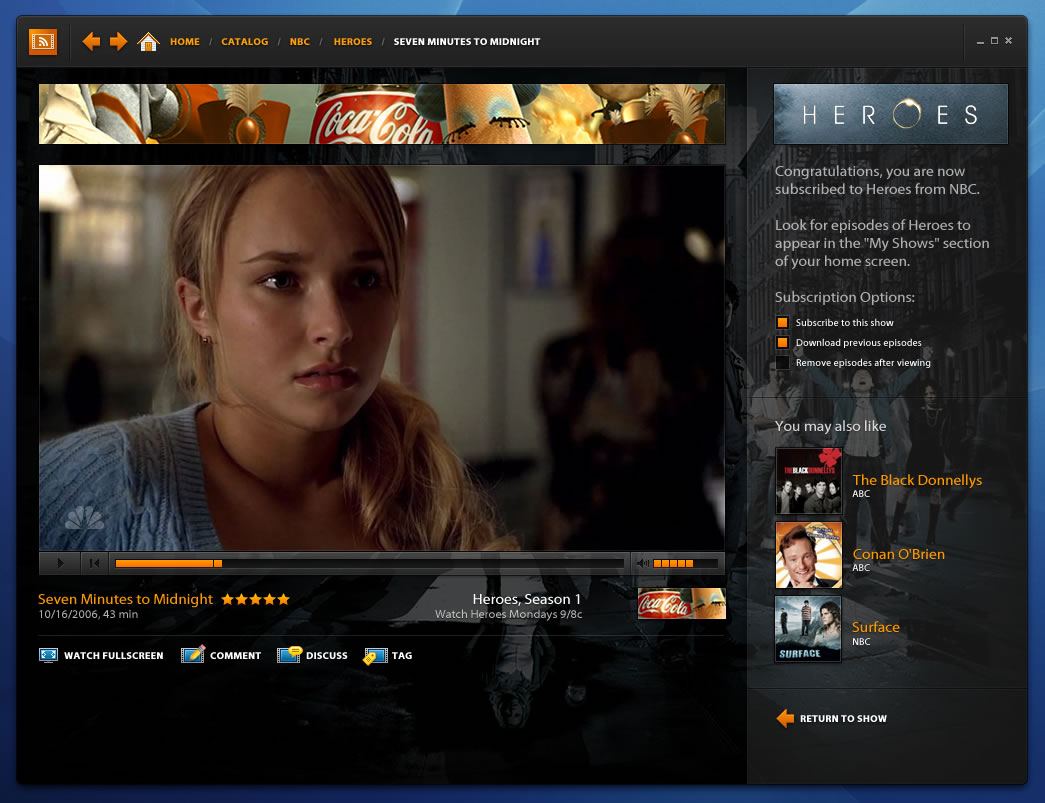
Picture taken from : http://plod.popoever.com/archives/001286.html
What i love most about this is the capability to play Flash video (flv), podcasts and QuickTime movies.
As I mentioned before, this software are suitable for your desktop media player.
You can try new version right here : http://labs.adobe.com/technologies/mediaplayer/install/
Subscribe to:
Posts (Atom)
PPL IAIN Syekh Nurjati Cirebon
Jika ditanya apa yang kau suka dari kehadiran mereka? Mereka punya jawabannya : semangat yang tinggi dengan keingintahuan yang tipikal mahas...

-
 Jika ditanya apa yang kau suka dari kehadiran mereka? Mereka punya jawabannya : semangat yang tinggi dengan keingintahuan yang tipikal mahas...
 -
 Istriku berteriak kegiarangan di Whatsapp. Jumat itu, sedari pagi seperti yang ia janjikan, ia bergegas menuju ke kantor pos di Sarijadi. ...
