Rather than Flash lite 2.x, you can not modifications its _focusrect property. By default _focusrect be yellow box around.
You can toggle _focusrect by using
_focusrect = false;
Using the SetFocusRectColor command within your Flash Lite 2.x and 3 applications is easy, as there is a custom fscommand2.
fscommand2("SetFocusRectColor", 0, 0, 0);
Selection.setFocus(any_mc);
You need to set the color to replace 0,0,0.
Showing posts with label Code. Show all posts
Showing posts with label Code. Show all posts
13 April 2009
02 April 2009
_focusrect in input text
Usually if we create flash lite application, we use input type to collect some data. It can any variable to send to database or any query to specific URL.
While you doing that, sometime you want to disable any focus rectangle (yellow box) on button. You can use this code that apply to button :
on (rollOver) {
_focusrect = true;
}
While you leave those button away from yellow box, you can enable each input type by adding code to first frame :
tex1._focusrect = true;
That if you already set input text name as text1.
While you doing that, sometime you want to disable any focus rectangle (yellow box) on button. You can use this code that apply to button :
on (rollOver) {
_focusrect = true;
}
While you leave those button away from yellow box, you can enable each input type by adding code to first frame :
tex1._focusrect = true;
That if you already set input text name as text1.


01 April 2009
Place Movie Clip On Specific Area
I have one movieclip or MC, and I want to have it on top of the page. Maybe it would be so easy to do so. You just make an movie clip in flash lite, and then put it whit align help panel to set it right in the center area.
Done.
But how if you dont know the size of mobile screen size. It has different size, from 240*320, 176*208, 352*416, and so on. First, you need to get information about size. You can use Stage.width; (get width) and Stage.height; (to get its height). So for example, you make stageWidth_txt text with variable name : stageWidth_txt. Then in first frame you type :
onEnterFrame = function()
{
stageWidth_txt.text = Stage.width;
}
Then it will tell the width of the screen size.
With this information, when you make a movie clip with name : box_mc, you can set it to get middle and top of screen with :
onEnterFrame = function()
{
setProperty( "box_mc", _y, 0 );
setProperty( "box_mc", _x, (Stage.width/2) );
}
Done.
But how if you dont know the size of mobile screen size. It has different size, from 240*320, 176*208, 352*416, and so on. First, you need to get information about size. You can use Stage.width; (get width) and Stage.height; (to get its height). So for example, you make stageWidth_txt text with variable name : stageWidth_txt. Then in first frame you type :
onEnterFrame = function()
{
stageWidth_txt.text = Stage.width;
}
Then it will tell the width of the screen size.
With this information, when you make a movie clip with name : box_mc, you can set it to get middle and top of screen with :
onEnterFrame = function()
{
setProperty( "box_mc", _y, 0 );
setProperty( "box_mc", _x, (Stage.width/2) );
}
05 November 2008
Looping for specific time in movie clip
File size are really matter when you working with flash lite. Specially when you making application with flash lite 1.* or 2.*. They will asking for lower than 100 kb as file size.
So, coding will be important. When you create movie clip and asking it for looping only several times, you will rather using coding than making movie clip many. So, for example, you want to have a movie clip only looping 3 times or 5 times, you can try this one.
Put a code in frame 1 :
var countMe = 0;
var howManyTimes = 2;
(Notes : 0 is included as a number..This would loop 3 times)
Then on frame 2 add keyframe, and do nothing.
On last frame :
if (countMe==howManyTimes) {
stop();
} else {
countMe++;
gotoAndPlay(2);
// note: cannot go back to frame one because countMe var
// would get reset if that frame is entered...
}
And, you are done!
So, coding will be important. When you create movie clip and asking it for looping only several times, you will rather using coding than making movie clip many. So, for example, you want to have a movie clip only looping 3 times or 5 times, you can try this one.
Put a code in frame 1 :
var countMe = 0;
var howManyTimes = 2;
(Notes : 0 is included as a number..This would loop 3 times)
Then on frame 2 add keyframe, and do nothing.
On last frame :
if (countMe==howManyTimes) {
stop();
} else {
countMe++;
gotoAndPlay(2);
// note: cannot go back to frame one because countMe var
// would get reset if that frame is entered...
}
And, you are done!
18 September 2008
Flash Lite 1.1 Player Error Messages
While you finish the rest of your flash lite application, sometime you keep press Ctrl+Enter to check your application on Flash Emulator. Once you have problem with those, you will see any error message that will appear on the emulator.
This can help you to get away from more problem when you test on real handset. Like when I try to place movie clip into movie clip with loadMovie(url,"some_mc");, I found problem on it.

It is said :
So what is Problem with content: 5 anyway?
Adobe developer center bring solution with describe all this code problem.
Here's a complete list of the "Problem with content: number" messages you may encounter, listed by error number:
1. Out of memory
2. Stack limit reached
3. Corrupt SWF data
4. ActionScript stuck
5. Infinite AS loop
6. Bad JPEG data
7. Bad sound data
8. Cannot find host
9. ActionScript error
10. URL too long
Usually after the Flash Lite 1.1 player prompts you with a message, you need to exit the player, relaunch it, and open the SWF file again.
This can help you to get away from more problem when you test on real handset. Like when I try to place movie clip into movie clip with loadMovie(url,"some_mc");, I found problem on it.

It is said :
Problem with content: 5 - Invalid ActionScript in SWF data.
So what is Problem with content: 5 anyway?
Adobe developer center bring solution with describe all this code problem.
Here's a complete list of the "Problem with content: number" messages you may encounter, listed by error number:
1. Out of memory
2. Stack limit reached
3. Corrupt SWF data
4. ActionScript stuck
5. Infinite AS loop
6. Bad JPEG data
7. Bad sound data
8. Cannot find host
9. ActionScript error
10. URL too long
Usually after the Flash Lite 1.1 player prompts you with a message, you need to exit the player, relaunch it, and open the SWF file again.
25 August 2008
Random Welcome Screen
I love tricky way to generate random frame to be stopped. For example, you have frame 1-10 with different movie clip on it. So,whenever user click a button,they will get surprises with different welcome screen.
Here we go.
on (release) {
// Sets the number of digits in the random sequence:
var mySetting = 3;
// Creates a random number:
myNumber = random(mySetting)+1;
// Checks to see if it is repeating itself:
if (myNumber == myTemp) {
// If it is repeating it generates a new random number:
myNumber = random(mySetting)+1;
gotoAndStop(myNumber);
// Continues as above:
if (myNumber == myTemp) {
myNumber = random(mySetting)+1;
gotoAndStop(myNumber);
if (myNumber == myTemp) {
myNumber = random(mySetting)+1;
gotoAndStop(myNumber);
if (myNumber == myTemp) {
myNumber = random(mySetting)+1;
gotoAndStop(myNumber);
}
}
}
}
// Displays the random number:
myDisplay = myNumber;
// Resets the variable to the new random number:
myTemp = myNumber;
}
Thanks for Phil Sculz for sharing this.
Here we go.
on (release) {
// Sets the number of digits in the random sequence:
var mySetting = 3;
// Creates a random number:
myNumber = random(mySetting)+1;
// Checks to see if it is repeating itself:
if (myNumber == myTemp) {
// If it is repeating it generates a new random number:
myNumber = random(mySetting)+1;
gotoAndStop(myNumber);
// Continues as above:
if (myNumber == myTemp) {
myNumber = random(mySetting)+1;
gotoAndStop(myNumber);
if (myNumber == myTemp) {
myNumber = random(mySetting)+1;
gotoAndStop(myNumber);
if (myNumber == myTemp) {
myNumber = random(mySetting)+1;
gotoAndStop(myNumber);
}
}
}
}
// Displays the random number:
myDisplay = myNumber;
// Resets the variable to the new random number:
myTemp = myNumber;
}
Thanks for Phil Sculz for sharing this.
23 July 2008
Flash Lite UI Component Examples
Here are some nice and lightweight components directly from the Experience Design team at Adobe Mobile and Devices.
What will you get from them:
* Discover how to create low memory yet rich components
* List, Slider, Tile, NavModel and Gapper components for Flash Lite 2.x/3.x
* Carousel, Menu, Story and scroll bars in Flash Lite 1.1
* Key Handling for Flash Lite 1.1 and Flash Lite 2.x/3.x
* Image Handling, loading and unloading etc (TileMenu)
* Creating device UI and multi-screen applications (NavModel)

Grab this here.
What will you get from them:
* Discover how to create low memory yet rich components
* List, Slider, Tile, NavModel and Gapper components for Flash Lite 2.x/3.x
* Carousel, Menu, Story and scroll bars in Flash Lite 1.1
* Key Handling for Flash Lite 1.1 and Flash Lite 2.x/3.x
* Image Handling, loading and unloading etc (TileMenu)
* Creating device UI and multi-screen applications (NavModel)

Grab this here.
09 July 2008
Bvlgari Stop Watch Timer
Today, i just realized that some analog watch use smallest hand just for stop watch guide. It is different than other watch, which use 3 kind of hands for pointing hour, minute and second.
Please check Bvlgari with Calibro 303 series. It has 3 small circles on it. The lower one is pointing second hand. So it will be little hard to create small Flash Lite screensaver with different purpose as usual.

So, we need to create small stop watch function as part of watch working. To help, we need to use function GetTimer().
time1=getTimer();
Also we need to put 3 buttons on the stage, start, stop and reset. In layer called action script, we add this code : stop() on frame 1, /:time2=getTimer();/out=/:time2-/:time1; (on second frame), and gotoAndPlay("count"); (on third frame).
On Start Button, add this code :
on(keyPress "1"){
/:time1=getTimer();
gotoAndPlay("count");
}
On Stop Button:
on(keyPress "2"){
gotoAndStop("full");
/:time2=getTimer();
/:duration = /:time2 - /:time1;
/:output = "Elapsed Time: " add /:duration;
}
On Reset Button:
on(keyPress "3"){
/:output="0";
gotoAndPlay("Stopped");
}
Thanks for Phillip Lam for great tutorial articles.
Please check Bvlgari with Calibro 303 series. It has 3 small circles on it. The lower one is pointing second hand. So it will be little hard to create small Flash Lite screensaver with different purpose as usual.
So, we need to create small stop watch function as part of watch working. To help, we need to use function GetTimer().
time1=getTimer();
Also we need to put 3 buttons on the stage, start, stop and reset. In layer called action script, we add this code : stop() on frame 1, /:time2=getTimer();/out=/:time2-/:time1; (on second frame), and gotoAndPlay("count"); (on third frame).
On Start Button, add this code :
on(keyPress "1"){
/:time1=getTimer();
gotoAndPlay("count");
}
On Stop Button:
on(keyPress "2"){
gotoAndStop("full");
/:time2=getTimer();
/:duration = /:time2 - /:time1;
/:output = "Elapsed Time: " add /:duration;
}
On Reset Button:
on(keyPress "3"){
/:output="0";
gotoAndPlay("Stopped");
}
Thanks for Phillip Lam for great tutorial articles.
12 August 2007
Johnnie Walker Flash Lite Application
Big fans of the famous Johnnie Walker? and dare to have one Flash Lite Application about it? you may take a look of this site :
http://www.johnniewalkerdigitalpa.com/demo.
Developed by Stefan, Rick, Dave & Jon from Breakdesign (The Dawn of the Fly guys) for about 2-3 months.
It won a silver, gold and Yahoo best of show award at the Asia Interactive Awards!
They will let us know as soon as it is legally available for download (it is working)!. This application work in Singapore.
for
http://www.johnniewalkerdigitalpa.com/demo.
Developed by Stefan, Rick, Dave & Jon from Breakdesign (The Dawn of the Fly guys) for about 2-3 months.
It won a silver, gold and Yahoo best of show award at the Asia Interactive Awards!
They will let us know as soon as it is legally available for download (it is working)!. This application work in Singapore.
for
03 July 2007
Code : About "Add" and "+" on Flash Lite 1.1
If you wonder why 9:00 reads "9:0" in Flash Lite1.1? this because Flash Lite 1.1 uses the add operator for string concatenation. + is
for numbers only, not strings.
So try :
minutes = ("O" add minutes);
rather than :
/:minutes = FSCommand2(" GetTimeMinutes" );
if(10>minutes)
{
minutes = ("O"+minutes) ;
for numbers only, not strings.
So try :
minutes = ("O" add minutes);
rather than :
/:minutes = FSCommand2(" GetTimeMinutes" );
if(10>minutes)
{
minutes = ("O"+minutes) ;
16 August 2006
CODING : loading external video
Scott Janousek give a good tips on loading external video.
1. Depending on your setup (device, network, etc) ... try using: rtsp:// instead of http:// to target the clip.
2. Make sure the target clip is encoded correctly (by testing it on the target device). Test with the actual video device player to be sure.
3. Use a getURL to target the 3gp clip ... see if the device video player can render it.
4. Also make sure the dimensions of the video match those set on your stage proportionally.
5. Make sure the video clip on the stage has an instance name assigned to target ... in your case: my_video.
1. Depending on your setup (device, network, etc) ... try using: rtsp:// instead of http:// to target the clip.
2. Make sure the target clip is encoded correctly (by testing it on the target device). Test with the actual video device player to be sure.
3. Use a getURL to target the 3gp clip ... see if the device video player can render it.
4. Also make sure the dimensions of the video match those set on your stage proportionally.
5. Make sure the video clip on the stage has an instance name assigned to target ... in your case: my_video.
14 March 2006
Optimization Tips and Tricks for Flash Lite 2
Great tips from Jonathan Duran, Macromedia Developer Support Manager for Mobile and Devices, to optimize file for Flash Lite 2.
Monitoring and Managing Memory on the Device
Monitoring and Managing Memory on the Device
- Use size reports to manage SWF file size
- FSCommand2(“GetTotalPlayerMemory”)
- FSCommand2(“GetFreePlayerMemory”)
Optimizing Assets
- Avoid complex vectors with too many curves and points.
- Attempt to use primitive vectors including circles, squares, and lines.
- Experiment converting vectors to JPEGs and test how this affects performance.
- Wherever possible use JPEGs optimized for smaller file size in an external editor such as Photoshop or Fireworks and save for the appropriate bit depth.
- Use PNGs if bitmap transparency is required and cannot be faked by using masked JPEGs or JPEGs merged with the background.
- When using transparent PNGs insure that they do not overlap (including the transparent areas). Rendering transparency through another transparency will exponentially burden the processor.
- Experiment converting JPEGs to vectors (via Trace Bitmap command in Flash) and test how this affects performance.
On Framerates
- Most supported handsets will playback Flash at 12-15 frames per second(fps)
- Low-end = 6-12 fps
- Average = 12-15 fps
- High-end = 15+ fps
- During development limit the framerate to resemble playback speed on target handset to test responsiveness and speed of animation in low fps situations
- Set the framerate to at least 20 fps when publishing final file to avoid artificially limiting performance should the handset be capable of higher framerate
Animation Performance
- Transparency and gradients are processor intensive tasks and should be used sparingly. Experiment with faking transparency using JPEGs, masks, and gradients.
- Adjusting the render quality
- You can control this during playback to improve performance
- fscommand2("SetQuality", "low");
- fscommand2("SetQuality", "high");
- It is important to remember that with a typical mobile UI, without a stylus, the user’s eye can usually only follow one thing at a time.
- Make the area of focus well designed and animated, then reduce animation and effects in other areas of the screen.
- Pause passive background animation (i.e. subtle background effects) during transitions.
- Content performance will be directly affected by percentage of the screen being updated simultaneously. Avoid designs that rely on frequent full-screen refreshes.
- Avoid tweening too many items simultaneously. Reduce the number of tweens and/or sequence animation so that one begins when another ends.
- Test adding/removing animated elements to weigh their impact on performance.
- Use easing wisely. On slower hardware it can create an “appearance” of lag.
Code Performance
- Timeline
- Use frame-based loops sparingly
- Stop frame-based loops as soon as they are not needed
- Where possible, distribute complex blocks of code across more than one frame
- ActionScript
- Use scripted animation sparingly
- Avoid array emulation
- Avoid doing string manipulation
- Scripts with hundreds of lines of code will be just as processor intensive as timelines with hundred of frames of tweens
- Evaluate content to determine whether animation/interaction can be easily achieved with the timeline, or simplified and made modular using ActionScript
- Use frame calls to make ActionScript calls only as needed and avoid too many looping “if” statement movie clips that do not terminate
06 March 2006
Coding : noScale
One thing if you used to worked with Emulator, you can test your application to many handset available on Flash 8 Mobile Emulator.Its equiped with different device profiles. Most Nokia have 176 * 208 (3230,6260,6620,6630,6670,6680 etc), but Nokia N-90 has 352 * 416.So it will be a problem if we like to test out on N-90.It will be scalling up and looking bad.
So if you want to support both device we'll have to use
Stage.scaleMode = "noScale"
or you can trace it size with
trace ( _root._xscale);
trace ( _root._yscale);
trace (Stage.width);
trace (Stage.height);
and you can set the display location by Stage.align = "TL", it will moves the swf to the top left corner.
Stclaus1 post on FLash Lite grups with his opinion ; "The second solution is to leave stage as is (Stage.scaleMode = showAll) with no content change. But there is problem of the final
output which will be displayed on N90 handset and its distortion.
I am using only dynamic textfield and device font."
While Richard give a simple and powerfull FLA file to test this issues. You can download here.
So if you want to support both device we'll have to use
Stage.scaleMode = "noScale"
or you can trace it size with
trace ( _root._xscale);
trace ( _root._yscale);
trace (Stage.width);
trace (Stage.height);
and you can set the display location by Stage.align = "TL", it will moves the swf to the top left corner.
Stclaus1 post on FLash Lite grups with his opinion ; "The second solution is to leave stage as is (Stage.scaleMode = showAll) with no content change. But there is problem of the final
output which will be displayed on N90 handset and its distortion.
I am using only dynamic textfield and device font."
While Richard give a simple and powerfull FLA file to test this issues. You can download here.
02 March 2006
Embedding Flash Lite in Mobile Pages
For some reason, my friend trying to publish our swf file to mini wap site.And it take XHTML tags to apply it.Well, im not kind of familiar for coding with wap site.
So i go through googgle to find help.It took me to Richard page.Nice tips of using Dreamweaver 8 to embedded flash file to specific type. It have capability to set page into XHTML mobile1.0.
And here are the tag ;
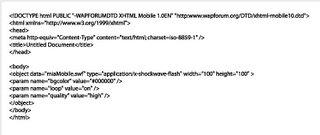 Richard say : that this doesn't work on all phones, only phones with the Flash player integrated as the plug-in, such as most Japanese i-mode handsets and according to the Nokia emulator at least, the new wave of Series 60 (ed 3) phones soon to be released. On our developer installs this still prompts us to click the Flash movie to open it.
So i go through googgle to find help.It took me to Richard page.Nice tips of using Dreamweaver 8 to embedded flash file to specific type. It have capability to set page into XHTML mobile1.0.
And here are the tag ;
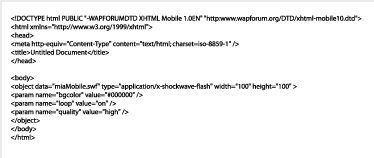 Richard say : that this doesn't work on all phones, only phones with the Flash player integrated as the plug-in, such as most Japanese i-mode handsets and according to the Nokia emulator at least, the new wave of Series 60 (ed 3) phones soon to be released. On our developer installs this still prompts us to click the Flash movie to open it.
23 January 2006
Coding : Best Practice for Key Detection in Flash Lite 2
Tips using key Detection from luar Using Button
In Flash Lite 1.1, if we want to detect a key press (single press or continuous press), we need to attach the code to a button:
keyPress “” {
no += 1;
}
In Flash Lite 2, we can use back modern ActionScript, use Movie Clip or Object to do the key detection, for example:
Using Movie Clip as Key Listener
mc.onKeyDown = function(){
switch(Key.getCode()) {
case Key.UP :
no += 1;
break;
}
};
Key.addListener(mc);
Using Object as Key Listener
obj = new Object();
obj.onKeyDown = function(){
switch(Key.getCode()){
case Key.UP:
no += 1;
break;
}
}
Key.addListener(obj);
However, using key listener has a side effect, you cannot detect continuous key press (press the key without release). If you want to detect continuous key press, you need to use an
MovieClip.onEnterFrame:
mc.onEnterFrame = function(){
if(Key.isDown(Key.UP)){
no += 1;
}
};
//Key.addListener(obj);
By the way, I find the Flash Lite 2 emulator is even worse than Flash Lite 1.1 emulator because the latter one support pressing keyboard for testing (single press or continuous press), no need to use the mouse to click the phone button.
Here is the summary of the above testing:
In Flash Lite 1.1, if we want to detect a key press (single press or continuous press), we need to attach the code to a button:
keyPress “
no += 1;
}
In Flash Lite 2, we can use back modern ActionScript, use Movie Clip or Object to do the key detection, for example:
Using Movie Clip as Key Listener
mc.onKeyDown = function(){
switch(Key.getCode()) {
case Key.UP :
no += 1;
break;
}
};
Key.addListener(mc);
Using Object as Key Listener
obj = new Object();
obj.onKeyDown = function(){
switch(Key.getCode()){
case Key.UP:
no += 1;
break;
}
}
Key.addListener(obj);
However, using key listener has a side effect, you cannot detect continuous key press (press the key without release). If you want to detect continuous key press, you need to use an
MovieClip.onEnterFrame:
mc.onEnterFrame = function(){
if(Key.isDown(Key.UP)){
no += 1;
}
};
//Key.addListener(obj);
By the way, I find the Flash Lite 2 emulator is even worse than Flash Lite 1.1 emulator because the latter one support pressing keyboard for testing (single press or continuous press), no need to use the mouse to click the phone button.
Here is the summary of the above testing:
| Continuous Pressing Detecting Method | Press without Release in Handset | Press phone button without Release | Press the key in the PC keyboard without Release | ||
| FL 1.1 Emulator | FL 2 Emulator | FL 1.1 Emulator | FL 2 Emulator | ||
| Button | Support (Slower) | Not Support | Not Support | Support | Not Support |
| Object | Not Support | N/A | Not Support | N/A | Not Support |
| Movie Clip | Not Support | N/A | Not Support | N/A | Not Support |
| Movie Clip onEnterFrame | Support (Faster) | N/A | Support | N/A | Not Support |
17 January 2006
Coding : Creating Trials for Flash Lite Apps (Part II)
Another tips from Richard Leggett in creating a 10 day trial Flash Lite application.
In Flash Lite 2.0, we can do this with Local Shared Objects, this is also great to keep the information from prying eyes as you have to know where to look for the SO's in order to try and crack them, the down side is that a little bit of digging a while back showed they look fairly similar (if not the same) as desktop Flash Player SO's and therefore there are already tools available to read them. Either way, they are a boon to Flash Lite development for many other reasons.
However, we aren't able to use SO's in Flash Lite 1.1, so we are going to use a very simple EXE bundled with the app to write to and update a text file, "config.dat".
The first step is to create a new Flash Lite 1.1 FLA, and create a sub-folder in it's directory called "config". Into this we put our EXE, Christian Halbach's flash2file (for which the source is available), and a plain text file named config.dat, which contains the following text:
uses=295 You might think that it's strange to set the number of uses to 295 to start, but this is because we are piping that number through a formula to figure out the real number:
Figure to store = 300 - (3n^2 + 5) Where n is equal to the number of uses so far. So with that in mind, we can visualise a table to suit:
| Number of uses: | Figure to store: |
| 0 | 295 |
| 1 | 292 |
| 2 | 283 |
| 3 | 268 |
| 4 | 247 |
| 5 | 220 |
| 6 | 287 |
| 7 | 148 |
| 8 | 103 |
| 9 | 52 |
Now that we can "hide" our number of uses in a not so obvious manner, we can go about hooking up our Flash Lite app with flash2file to read and write this value. On frame 1 I have the following code:
fscommand2("SetQuality", "high");

// Load in number of uses so far
uses = -1;
loadVariables("config.dat", "/");
On frame 2 the following:
// Loop until number of uses has loaded
if(uses != -1)
{
// Convert figure to useable value
// i.e. find x where x = 300 - (3n^2 + 5)
numUses = 300 - uses;
numUses = (numUses-5)/3;
numUses = (numUses==0) ? 0 : int(Math.sqrt(numUses));

// Display usage information
gotoAndStop(5);
}
else gotoAndStop(2);
...and finally on frame 5:
// Display number of uses
usesTxt = numUses add " uses so far";
if(numUses>=9) usesTxt = "Demo expired";

// Path to flash2file.exe
appname = "c:/documents/flash/flash2file.exe";

// Path to the file to write to
path = "c:/documents/flash/config.dat";

// Update numUses
numUses++;
uses = 300 - ((numUses*numUses)*3 + 5);

// Text to write to file
txt = "uses=" add uses;

// Update number of uses to text file
argument = appname add "," add path add "," add txt;
fscommand("Launch", argument);
As you've probably guessed, I've got a textfield with a variable name of "usesTxt", and not much else apart from the code. That's it. Now you could either exit the app, or display a nag if numUses is >= your desired figure.
Now we are ready to copy it all to the phone in order to allow flash2file to do its job... So our directory structure that we will mirror on the phone is as such:
- 10daytrial.swf
- config.dat
- flash2file.exe
Finally, copy the SWF and config folder to the phone's c:\documents\flash\ folder, and test the SWF. Ideally you would package this up as a SIS installer and get it to install to a non-public folder to better hide your config file.
You can download the finished project here - I have not included flash2file.exe as Christian has requested that you contact him for the latest version.
Summary:
This method is inherently insecure. The reason for this is that we are using some incredibly weak protection, simply using ord() and chr() to mask the number of uses is not really acceptable, but even if you did take the time to port md5 to Flash Lite 1.1 the SWF is still accessible, decompilable and crackable. There is nothing we can do about this, it happens on the web all the time. On the web we like to let the server deal with the security. On a phone we can do the same, but that might annoy the end user, so instead we need to look forward to some DRM integration and standardisation across the handset manufacturers in order for Flash Lite to leverage this functionality. One plus point is that mobile content is dirt cheap, it has to be; and it is therefore not usually worth the time it takes to crack even the simplest form of protection we might employ. The ringtones and mobile downloads industry is still booming even though people are able to bluetooth items for free.

Note if you are using the Flash Lite 2.0 player:
If using the FL2.0 player you will need to change the paths to c:\Nokia\Others or e:\Others for the Flash Lite player to pick up your SWF and for the app to function correctly.
13 January 2006
Coding : To Center Loaded Image Tips
We have to wait until the image is fully loaded before you can get it's dimensions, (so that is the onLoad handler in Flash Lite 2, with Flash Lite 1.1 you'll have to embed the image in a swf and use the _framesloaded and _totalframes to check if it is fully loaded). With that done you can access the _width and _height and use:
my_mc._x = Stage.width/2 - my_mc._width/2;
my_mc._y = Stage.height/2 - my_mc._height/2
Coding:Creating Trials for Flash Lite Apps
This is Richard Legger answer for David Williams question on the Flash Lite Yahoo Group asks, how do I make time limited trials in Flash Lite 1.1?
There are a few options to consider:
- Time out after a few minutes each time.
- Time out after X days and never run again.
- Lose functionality after X days or weeks.
Unfortunately it is getting late and I have work to do, so I've only got time to cover the first in that list, but I'm still writing my book on Flash Lite which is due March, and that will have detailed instructions and samples for each - end plug.
So the code for the first example is very simple, and I've included an FLA which contains a movie clip in the library that you can simply drag into your game or app to make sure it exits 3 minutes after starting up.
First up, create a new Flash document using a mobile template, and create a new movie clip, called "TrialMaker". Edit that movie clip and type the following code on frame 1:
timeout = 180;
startTime = getTimer();
Next up, create a keyframe on frame 10, and add the following:
if(getTimer()-startTime > timeout*1000)
{
fscommand("quit");
}

gotoAndPlay(2);
I chose frame 10, as this creates an automatic loop, a loop that doesn't execute code all that often thus having a negligable impact on your game execution speed whilst remaining fairly accurate (which we all know is essential for Flash Lite games). You can modify the value of timeout to any number of seconds you wish, I chose 3 minutes at Davids request.
If you are lucky enough to be using Flash Lite 2, you can simply add the following code to frame 1:
setInterval(function() { fscommand("quit"); }, 180000);
12 January 2006
Multi User Game
Wanna try flash game for multi user?
You can dopwnload here :
http://www.rawfish-software.com/index.php
You can dopwnload here :
http://www.rawfish-software.com/index.php
Set Numeric Input
This is one trick to set up our form variable into numeric.
The fscommand2 is SetInputTextType, and it works on 6620.
You have to be sure that "variableName" matches the variable that you've
assigned to the text field, e.g. if your text field property has the
"Var:" property set to input1, you should use
fscommand2("SetInputTextType", "input1", "Numeric");
The fscommand2 is SetInputTextType, and it works on 6620.
You have to be sure that "variableName" matches the variable that you've
assigned to the text field, e.g. if your text field property has the
"Var:" property set to input1, you should use
fscommand2("SetInputTextType", "input1", "Numeric");
Subscribe to:
Posts (Atom)
PPL IAIN Syekh Nurjati Cirebon
Jika ditanya apa yang kau suka dari kehadiran mereka? Mereka punya jawabannya : semangat yang tinggi dengan keingintahuan yang tipikal mahas...
-
 Jika ditanya apa yang kau suka dari kehadiran mereka? Mereka punya jawabannya : semangat yang tinggi dengan keingintahuan yang tipikal mahas...
-
 Istriku berteriak kegiarangan di Whatsapp. Jumat itu, sedari pagi seperti yang ia janjikan, ia bergegas menuju ke kantor pos di Sarijadi. ...
